

Your first test in 5 minutes
In 5 minutes, you run a first conversation with your bot from a terminal and read its answers. Each step is one call to the Evaluation API, shown with the real answer of a test bot, shortened. Identifiers are cut with … in the examples.
How a conversation runs
The bot takes from 1 to 60 seconds to answer, so the API does not keep you waiting: it accepts each message at once, and you read the answer when it is ready.
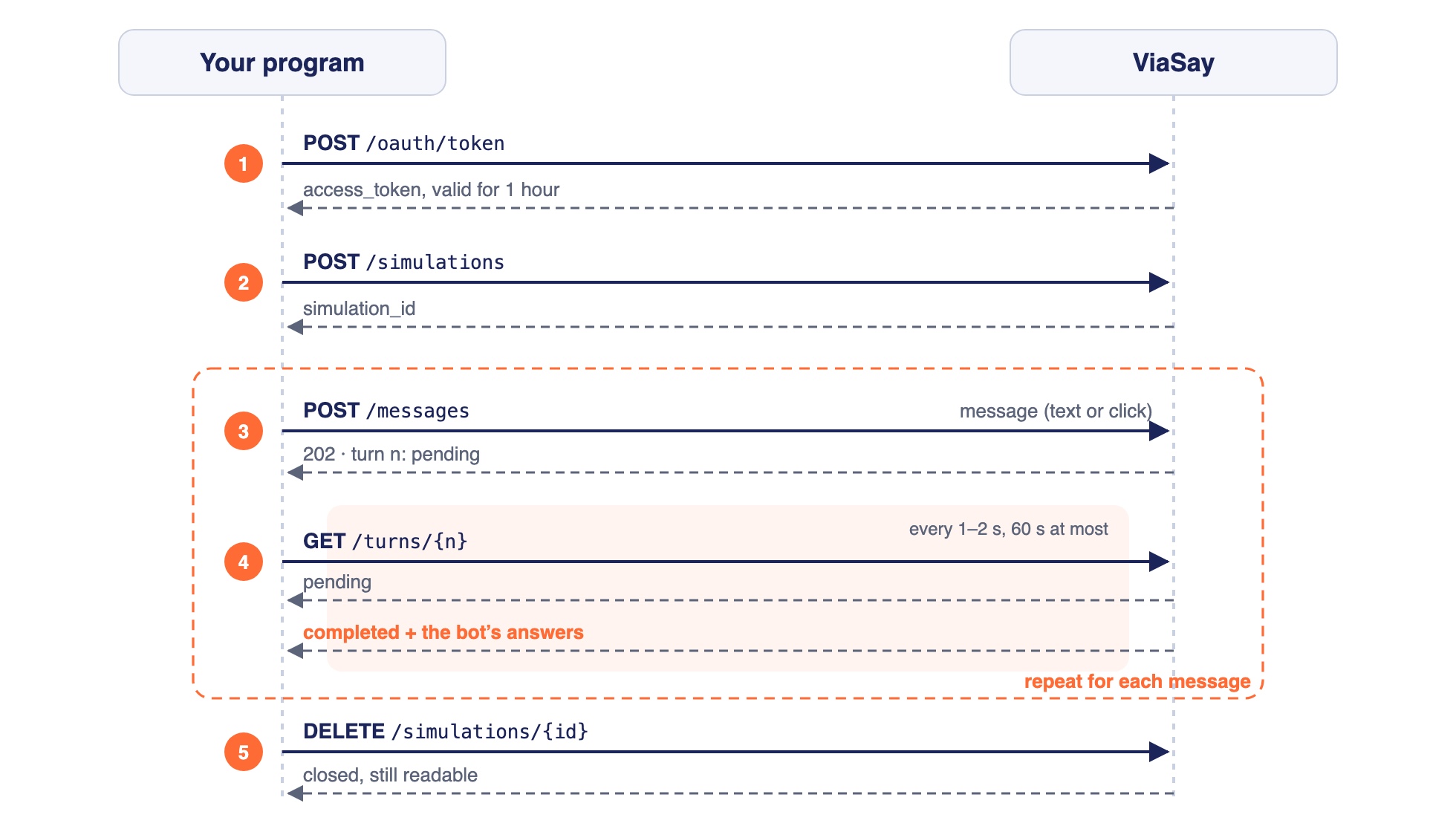
- A simulation is one conversation with the bot.
- A turn is the bot's answer to one of your messages: your first message gives turn 1, the next one turn 2, and so on.
Before you start
- The client ID and the client secret of an application, given by a Manager of the bot: see Applications.
- The address of the API:
https://chatbot.viasay.io/api. If your Manager sees another address under API endpoints in Settings › Applications, take the part before/oauth/token. - A terminal with
curlandjq, a tool that reads JSON. On a Mac:brew install jq.
Store these values once, between single quotes so that a ! or a $ in the secret is kept as is:
BASE='https://chatbot.viasay.io/api'
CLIENT_ID='paste-your-client-ID'
CLIENT_SECRET='paste-your-client-secret'
Step 1: Get a token
TOKEN=$(curl -s -X POST "$BASE/oauth/token" \
  -u "${CLIENT_ID}:${CLIENT_SECRET}" \
  -d grant_type=client_credentials | jq -r .access_token)
curl -s "$BASE/v1/evaluation/me" -H "Authorization: Bearer $TOKEN" | jq
{ "client_id": "eJ67c14T…", "name": "Partner CI", "scopes": ["evaluation:read", "evaluation:write"], "token_expires_in": 3600 }
The token is valid for 1 hour. If echo $TOKEN prints null, the client ID or the secret is wrong.
Note: a new token revokes the previous one that has the same scopes. Get one token and reuse it for the hour.
Step 2: Open a simulation
The simulation below talks to the whole bot ("type": "bot"), on the last saved version of its use cases ("version": "draft").
SIM=$(curl -s -X POST "$BASE/v1/evaluation/simulations" \
  -H "Authorization: Bearer $TOKEN" -H "Content-Type: application/json" \
  -d '{ "target": { "type": "bot" }, "version": "draft" }' | jq -r .simulation_id)
echo $SIM
It prints the identifier of the simulation, for example sim_784b7c9a…. A simulation expires after 15 minutes without a message.
Step 3: Send a message
Replace the text with a question your bot handles.
curl -s -X POST "$BASE/v1/evaluation/simulations/$SIM/messages" \
  -H "Authorization: Bearer $TOKEN" -H "Content-Type: application/json" \
  -d '{ "text": "I want to change the dates of my booking" }'
{ "turn": 1, "status": "pending" }
The API accepted the message: the bot is preparing turn 1.
Step 4: Read the bot's answer
Read turn 1. ?trace=none leaves out the trace of the turn (its steps, API calls and variables), which is long.
curl -s "$BASE/v1/evaluation/simulations/$SIM/turns/1?trace=none" \
  -H "Authorization: Bearer $TOKEN" | jq
While the bot prepares its answer, you get "status": "pending". Run the command again every 1 to 2 seconds: the answer usually comes within 15 seconds, 60 at most.
{
  "turn": 1,
  "status": "completed",
  "state": "awaiting_user",
  "answers": [ { "text": "To find your stay, I need your booking number and your last name.", "quick_replies": [], "buttons": [], "ai_generated": true } ],
  "handled_by": { "type": "use_case", "use_case_id": 5190, "name": "Post-Booking", "intent_record_id": 7907 },
  "waiting_for": { "question": "To find your stay, I need your booking number and your last name.", "expects": "free_text", "variable_name": "reply" },
  "duration_ms": 8473,
  "warnings": []
}
The table below says what each field of this turn tells you.
| Field | What it tells you |
|---|---|
status | the turn is over (completed), or failed (timeout, error) |
answers | the bot's bubbles, with their quick replies and buttons |
handled_by | who answered: here the use case 5190, picked by the bot from your message |
state | where the conversation stands: awaiting_user means the bot waits for an answer |
waiting_for | the question asked and the type of answer expected |
Step 5: Reply, then close
Each message gives the next turn: your reply is turn 2.
curl -s -X POST "$BASE/v1/evaluation/simulations/$SIM/messages" \
  -H "Authorization: Bearer $TOKEN" -H "Content-Type: application/json" \
  -d '{ "text": "AB12CD34EF56, Martin" }'
curl -s "$BASE/v1/evaluation/simulations/$SIM/turns/2?trace=none" \
  -H "Authorization: Bearer $TOKEN" | jq
To click a quick reply or a button of the previous turn, send its label instead: { "click": "Yes" }. When the conversation is over, close the simulation:
curl -s -X DELETE "$BASE/v1/evaluation/simulations/$SIM" \
  -H "Authorization: Bearer $TOKEN" | jq .status
It prints "completed". The simulation stays readable until 90 days after it was opened, with GET /v1/evaluation/simulations/{id}.
If it does not work
Every error of /v1/evaluation/… gives a code and a request_id to send to the support team. /oauth/token answers in the OAuth format, {"error": "…", "error_description": "…"}.
$TOKENisnull, or401 invalid_clienton/oauth/token: the client ID or the secret is wrong. If the secret is lost, ask the Manager to regenerate it.401 invalid_token: the token expired after 1 hour, or it was revoked: by a newer token with the same scopes (the Test button of Settings › Applications included), or because the Manager regenerated the secret, removed a scope or deleted the application. Get a new token.403 insufficient_scope: the application lacksevaluation:writeorevaluation:read. Ask the Manager to add it.409 turn_in_progress: the previous turn is stillpending. Wait until it is over.409 simulation_closedor410 simulation_expired: open a new simulation.422 use_case_not_published: withlive, the use case was never published. Usedraft, or publish it.
Next steps
- Test in batch in your CI: run many scenarios in one call.
- Evaluation API reference: the other targets, messages and variables.
Updated about 1 hour ago