

Sentiment report
Sentiment is where declared feedback and AI-read experience sit side by side. It holds your real user votes — CSAT and NPS — and the AI-computed CX Score and Dissatisfaction Drivers. Reading them together is the point: see CX Score vs CSAT for why they disagree and what that disagreement tells you.
The tab has three views, switched at the top: Dashboard (default), CSAT Report, and NPS.
Dashboard view
Satisfaction
How satisfied are users with the bot?
Four cards: CSAT Global (with thumbs up/down counts and a positive-ratio bar), CX Score (/10, carries the AI badge), CSAT Vote Rate (% of displays that got a vote) and Comment Rate (share of votes that left a comment). The vote rate is the reality check on CSAT itself: it's usually a small minority, which is exactly why the full-coverage CX Score exists next to it.
Drill-down: the CSAT Global card opens the negatively-rated conversations.
Quality Trends
How do scores evolve over time?
CX Score over time as a bar chart, with a dashed average reference line so you can see whether a segment is drifting above or below its own baseline. AI-computed.
Dissatisfaction Drivers
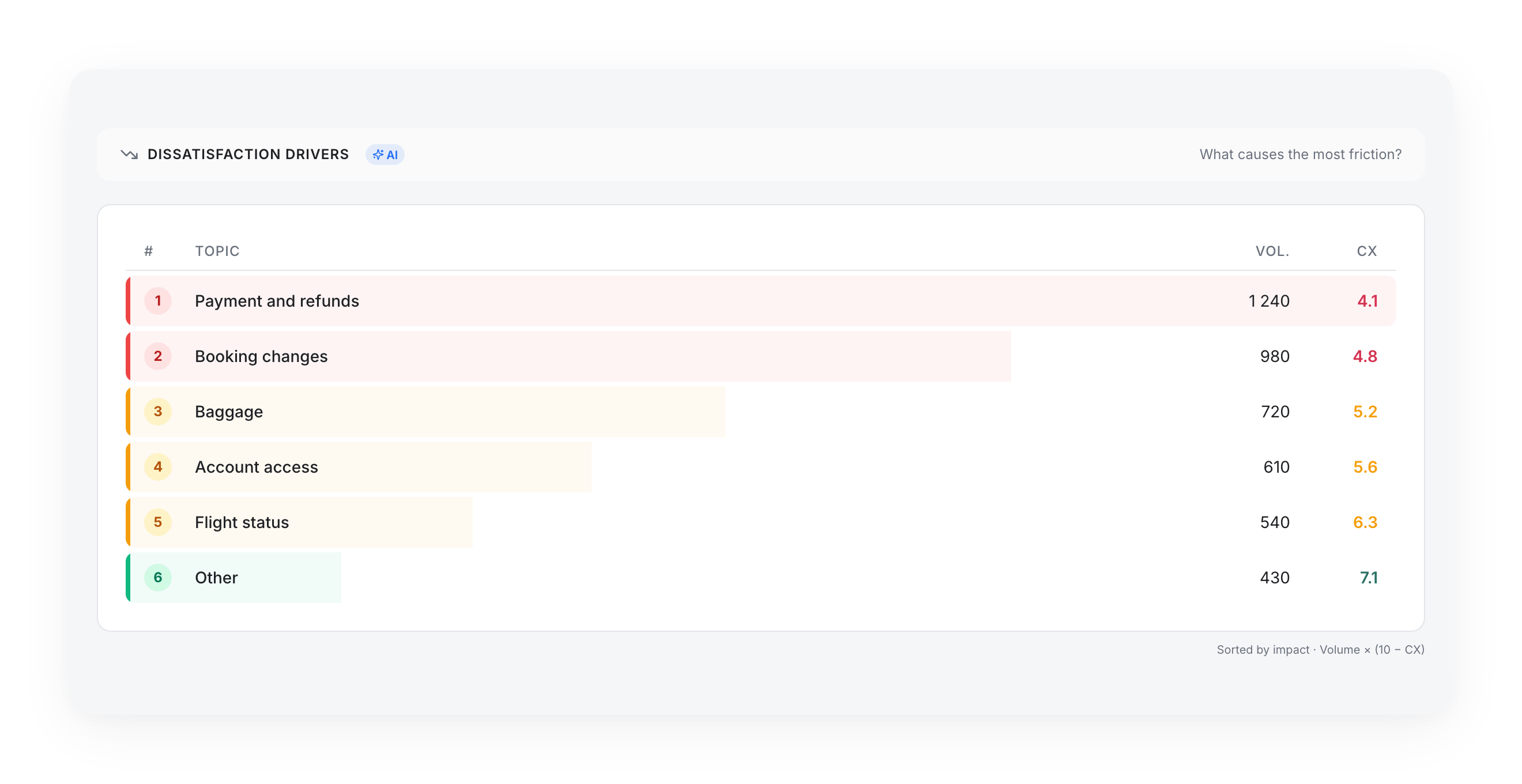
What causes the most friction?
A ranked list — # / Topic / Vol. / CX — sorted by impact = Volume × (10 − CX). Same logic as Unresolved Drivers, but on experience: the top row is the topic burning the most goodwill, not the one with the single lowest score. Carries the AI badge. This is the starting point for How to improve your CX Score.
CSAT by Knowledge Source
Which sources get the best feedback?
A sortable table — Source, Messages, CSAT, Votes — tying satisfaction back to the knowledge sources that answered. A source with a low CSAT and high volume is a content-quality lead; cross-read it with Knowledge Gaps.
CSAT Report view
A detailed breakdown of your real CSAT votes: a Global CSAT card, a CSAT Vote Rate card (total votes vs displayed), CSAT over time (score bars plus a vote-count line), and a By source explorer that lists sources next to a Recent conversations pane — the actual verbatims, with a link out to each full conversation.
CSAT has to be switched on
If you haven't enabled CSAT on your answers, this view tells you so and points you to do it. Deleted comments show as "CSAT comment deleted" for GDPR reasons.
NPS view
Your Net Promoter Score, if enabled: the NPS Score ring (range −100 to +100), a Promoters / Passives / Detractors breakdown, a statistics grid (Ratings / Displays / Response rate / Comments), and NPS over time. Like CSAT, NPS must be enabled first — the view links to how to set it up when it isn't.
Updated 3 months ago