

AI Resolution
AI Resolution is the share of engaged conversations where the evaluator judged that the user's request was handled.
Resolution = resolved conversations ÷ engaged conversations × 100
Engaged conversations are the Resolved and Unresolved ones. Conversations where the user left before there was anything to judge are filed as Left early and are not counted (see Three outcomes below).
You'll see it in Overview → Health, Overview → AI Impact, Overview → Louis, Use Cases and across the Performance report. The tooltip reads: "Share of engaged conversations the AI judged resolved. Left early conversations are not counted.".
What the evaluator is told to do
The evaluator opens with one instruction:
You are a strict evaluator for customer/virtual assistant conversations. Your task is to judge whether the assistant resolved the user's request.
It has an explicit list of what counts and what doesn't. Here it is, in plain language.
It reads the whole transcript, including what happened in the interface: the buttons the user tapped, the options the bot offered, and the links it offered or the user followed.
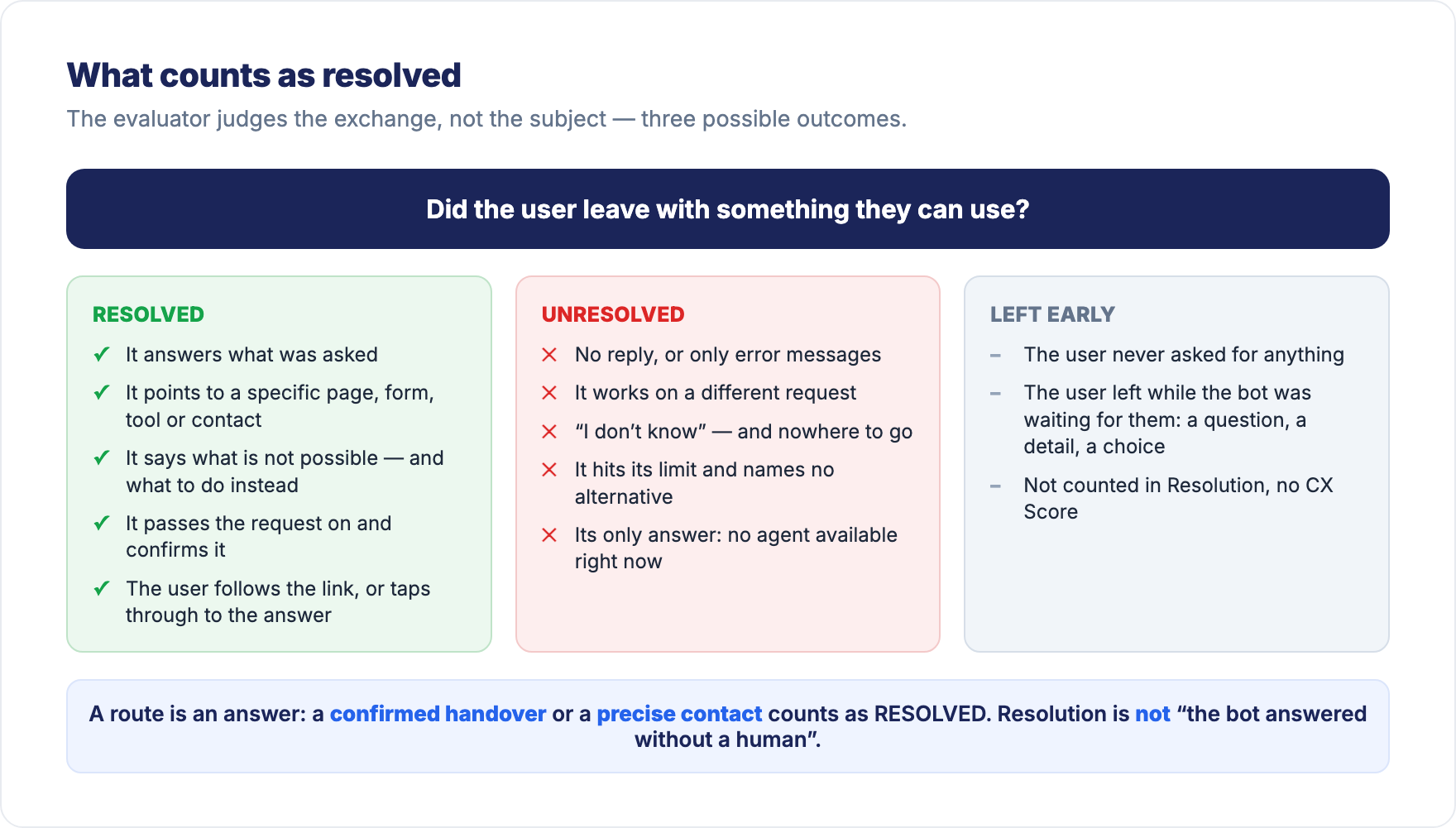
Counts as RESOLVED
The evaluator asks one question: doing what the bot said, could a reasonable user get what they asked for? If yes, the conversation is resolved. The bot does not have to hold the answer itself: sending the user where the answer lives is resolving.
- The bot answers what was asked, even briefly or partially, as long as the question itself is covered.
- The bot points to a specific place or action: a page, a document, a form, a self-service tool (a search, a simulator, a booking or quote form), an address, a contact, a person or team to ask.
- The bot says plainly that something is not possible or outside what it can do, and names what to do or where to go instead.
- The bot passes the request on and confirms it: message forwarded, ticket or callback created.
- The user followed a link the bot offered, and didn't come back to say it didn't work.
- The user only tapped buttons and got what they came for. Tapping is engagement, not silence.
An answer the user dislikes and a refusal that is correct both count: the user leaves with something they can use.
Counts as NOT RESOLVED
- The bot never replied, or only sent technical or error messages.
- The bot worked on a different request: it started another task, answered another question, gave the same reply twice while the user rephrased the same request, or asked again for something the user had already given.
- The bot says it doesn't have the information and points nowhere concrete, or points somewhere unrelated to the request.
- The bot talks around the request without answering it and without saying where the answer is.
- The bot hits its limit and says nothing about it, naming no alternative.
- The bot's only reply is that no human agent is available right now, even if it offers a callback. The user leaves with nothing they can act on.
Being unable to help is not a failure. Leaving the user with no route is. When the user made several requests, the evaluator judges the one they came for: a side question fumbled later does not undo a main request that was served.
Counts as LEFT EARLY
The user left before there was anything to judge. Two situations:
- The user never asked for anything. Only a greeting, a thank-you, a test, random characters, or a message plainly outside what your bot is for — and then they left.
- The user left while the bot was waiting for them. The bot was on the right track, a real next step was on the table, and the user never came back. That next step can be:
- an answer to a question the bot asked, or a clarification it needed
- a detail only the user can give: an order number, a date, a confirmation, a contact detail
- a choice among the options, buttons or menu offered before the bot had delivered anything on the request
- accepting a live transfer to a human agent that the bot offered
- an answer to a question asked by a human agent who took over
The evaluator must be able to name the pending step and the request it belonged to. If it can't, the conversation is not Left early.
Does NOT count as Left early, even if the user stopped answering
- The bot had already answered or given a route and only offered more topics, buttons or an "anything else?". What the user is free to ignore is not a pending step.
- The bot confirmed the request was passed on: message forwarded, ticket or callback created. The handover is complete.
- The user followed a link the bot offered and reported no further problem.
- The user declined an escalation the bot offered. That is an answer, not a pending step.
- The bot's only answer was that no human agent is available right now. A service that cannot answer is a failure, not a wait: that is Unresolved, even when a callback is offered.
- The bot worked on a different request than the one asked, or asked again for something the user had already given. That is Unresolved, even if the user then left.
- The bot never replied, or only sent error messages. That is Unresolved.
In these cases, the conversation is judged Resolved or Unresolved on what the bot actually delivered. A quick test: if the user can get what they came for without coming back to the chat, they were given a route, not a pending step.
Three outcomes: Resolved, Unresolved, Left early
Some conversations end before there is anything to judge: the user never asked for anything, or left while the bot was waiting for them (see Counts as LEFT EARLY above). The evaluator files them as Left early, apart from the two other outcomes.
| Outcome | What it means | Counted in Resolution | CX Score |
|---|---|---|---|
| Resolved | The AI judged that the conversation answered the user's need. | Yes | Yes |
| Unresolved | The user engaged, but the AI judged that their need was not met. | Yes | Yes |
| Left early | The user left before the conversation could be judged. | No | No score |
Such a conversation says nothing about how well your bot answers, so it doesn't weigh on the rate: Resolution is computed on the engaged conversations, the Resolved and Unresolved ones. It is never counted as a knowledge gap either.
In Overview → Health, the Resolution tile gives you both readings side by side: the rate, of N engaged conversations, and the split of every analyzed conversation between Resolved, Unresolved and Left early, of N analyzed conversations. The split adds up to 100%.

Knowledge Gap, Handover rate, Automation rate, CSAT and conversation volumes keep counting all conversations, Left early ones included.
Why did it judge that? Hover the tag
You never have to take a verdict on faith. In the conversations panel, every row carries its verdict as a tag — Resolved, Unresolved or Left early, plus Knowledge gap where it applies. Hover the tag: you see what the outcome means and, when available, the evaluator's reasoning in one sentence. To list one outcome only, use the Outcome filter of the panel: All, Resolved, Unresolved or Left early.
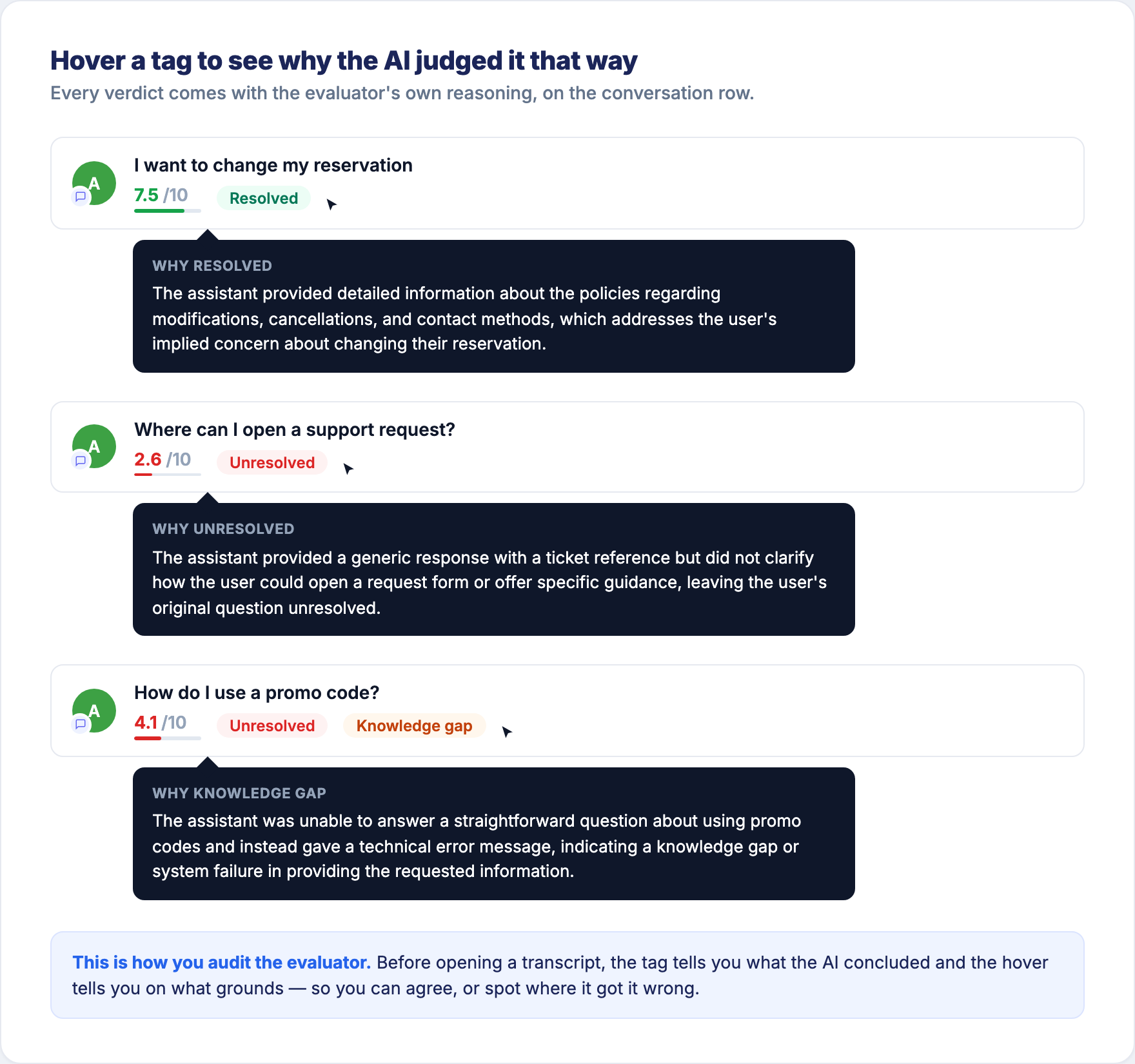
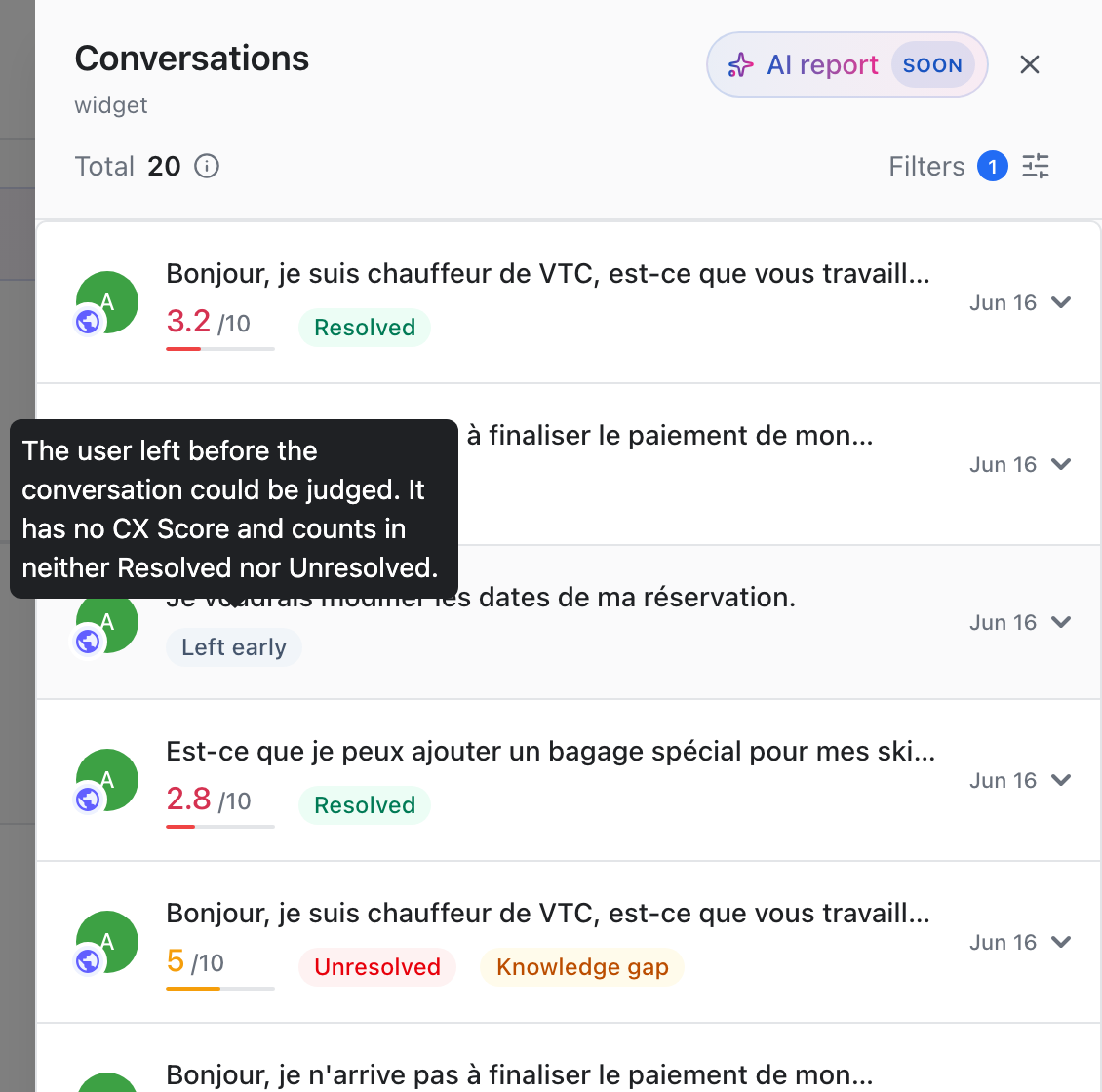
That sentence is the grounds for the judgement, not a summary of the conversation. Use it to triage a filtered list fast: you can usually tell within seconds whether you agree — and the ones where you don't are exactly the conversations worth opening in full.
Two things this number is not
These are the two misreadings that cause every argument about this metric.
Resolution is not "the bot answered without a human"
A correct escalation counts as resolved. The user needs a human. The bot recognises it and passes the request on with a confirmation, or gives them a real way to reach support. The request was handled. That is a good outcome, and the evaluator scores it as one.
What is not resolved is a dead end: the bot says it can't help and names nothing else, or its only answer is that no human agent is available right now.
If you are used to reading "resolution = no handover", set that definition aside here. It is a different metric. You'll find the no-handover view under Automation rate in Overview → Health.
Resolution does not measure whether the user was happy
The user's feelings are not part of this judgement. The evaluator measures objective effectiveness: was the request handled, yes or no.
Example. A customer asks for a refund. The policy says no refund. The bot states the policy correctly, clearly, with the right conditions. The customer is furious.
That conversation is RESOLVED. The bot did its job perfectly. The customer didn't like the answer — but "the customer didn't like the answer" is not a bot problem, it's a policy reality. Scoring it as a failure would tell you to fix a bot that isn't broken.
Frustration is not ignored, though. It is captured separately, in the CX Score and in Sentiment → Dissatisfaction Drivers. That separation is the point: it lets you tell "my bot is failing" apart from "my customers dislike this policy". Those two problems have very different fixes.
How to read this number
Expect a number lower than you imagined. That is normal.
You have never had this number before, so you have no reference point for it.
There is no target to hit here, and no benchmark to compare yourself against. This metric is new, and a resolution rate only means something against your own bot, on your own topics — it depends entirely on what you ask your bot to handle. A bot answering opening hours and a bot handling payment disputes are not the same job, and no single number is "good" for both.
What we can tell you is what to expect. The first number almost always reads lower than the impression you had. That is what happens when a strict evaluator — one that gives no credit for words that didn't help anyone — replaces an impression.
You are not reading a drop in performance. Nothing changed in your bot this month. You are reading the first honest measurement of a level that was always there.
The comparison that means something starts today: this topic against that topic, this month against last month. The level tells you where you start. The trend tells you whether the work is paying off.
These numbers move
This is not a fixed property of your bot. It is a measurement, and measurements move.
Three things move it, and you control two of them. Content: a topic fails because the answer isn't there, you add it, the topic recovers. Flows: a request needs a real path — a failed payment needs a retry, not a paragraph — and you build it. And the share of conversations you hand to a generative AI step rather than a scripted one, which the AI Impact section measures on your own data.
The point is narrower than a promise, and it holds: this is a number that moves — and you now have it.
The evaluator can be wrong, and it will get better
Be clear-eyed about what you are holding:
- It produces false positives. Some conversations it marks resolved were not.
- It produces false negatives. Some conversations it marks unresolved were handled fine.
- It is a judgement, not a fact. A different reader — including you — might rule differently on a borderline conversation.
- It will be improved over time. The criteria evolve as we learn where the evaluator is wrong.
None of this makes the number useless. Two reasons:
- It is consistent. The same criteria are applied to every conversation, every day. Even if the absolute level is imperfect, comparisons are solid — this topic versus that topic, this month versus last month. That is what you actually need to make decisions.
- You can check its work. Every number drills down to the real conversations behind it. Click a topic, read the transcripts, form your own opinion. If you disagree with the evaluator, you can see exactly where and tell us. Nothing is hidden.
Use it as a compass, not a verdict
Don't put this number in a contract or a bonus target. Use it to find where to look. Its job is to point you at the handful of topics that are costing you the most, out of the thousands of conversations you will never read. It does that job well.
Now act on it
Reading the number is step 1. To move it, follow How to improve your resolution — it starts from Performance → Unresolved Drivers and walks the find → read → fix → re-measure loop.
Updated 17 days ago