

How to improve your resolution
Everything on the metric pages is measurement. This is the part that produces value. It takes about an hour, and it is the single most useful thing you can do with this feature.
The one workflow that matters
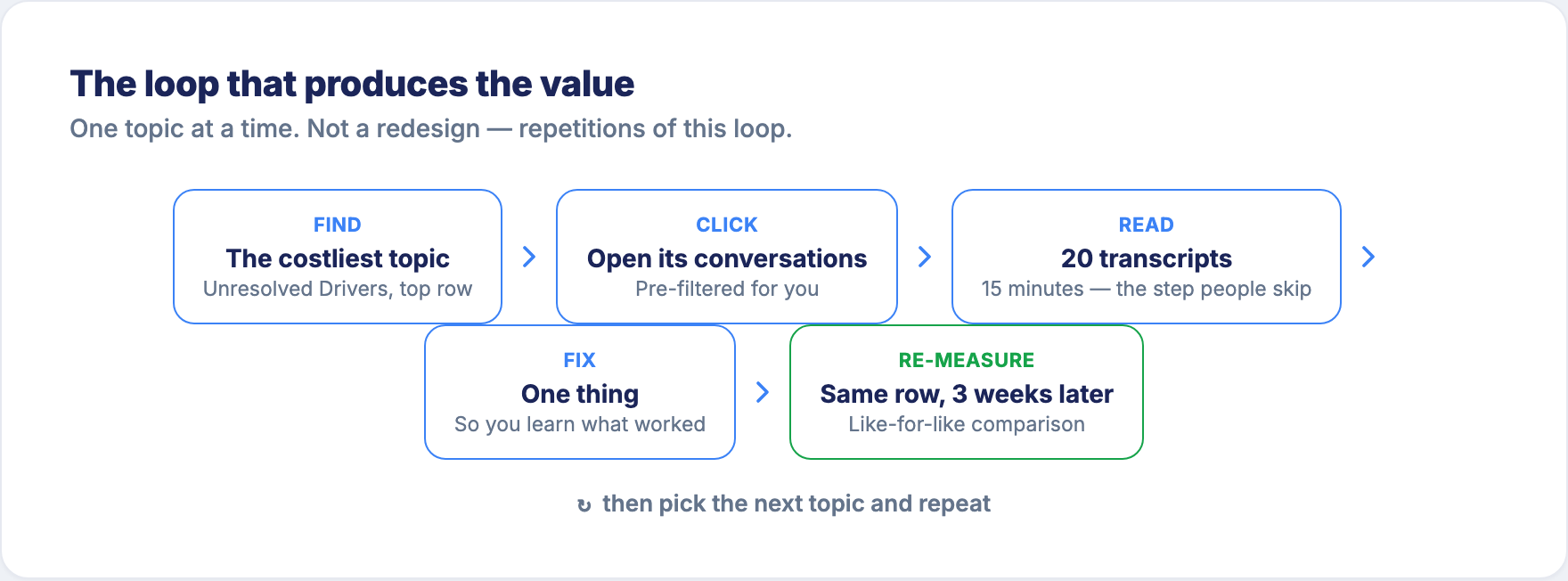
1. Find the topic that costs you the most
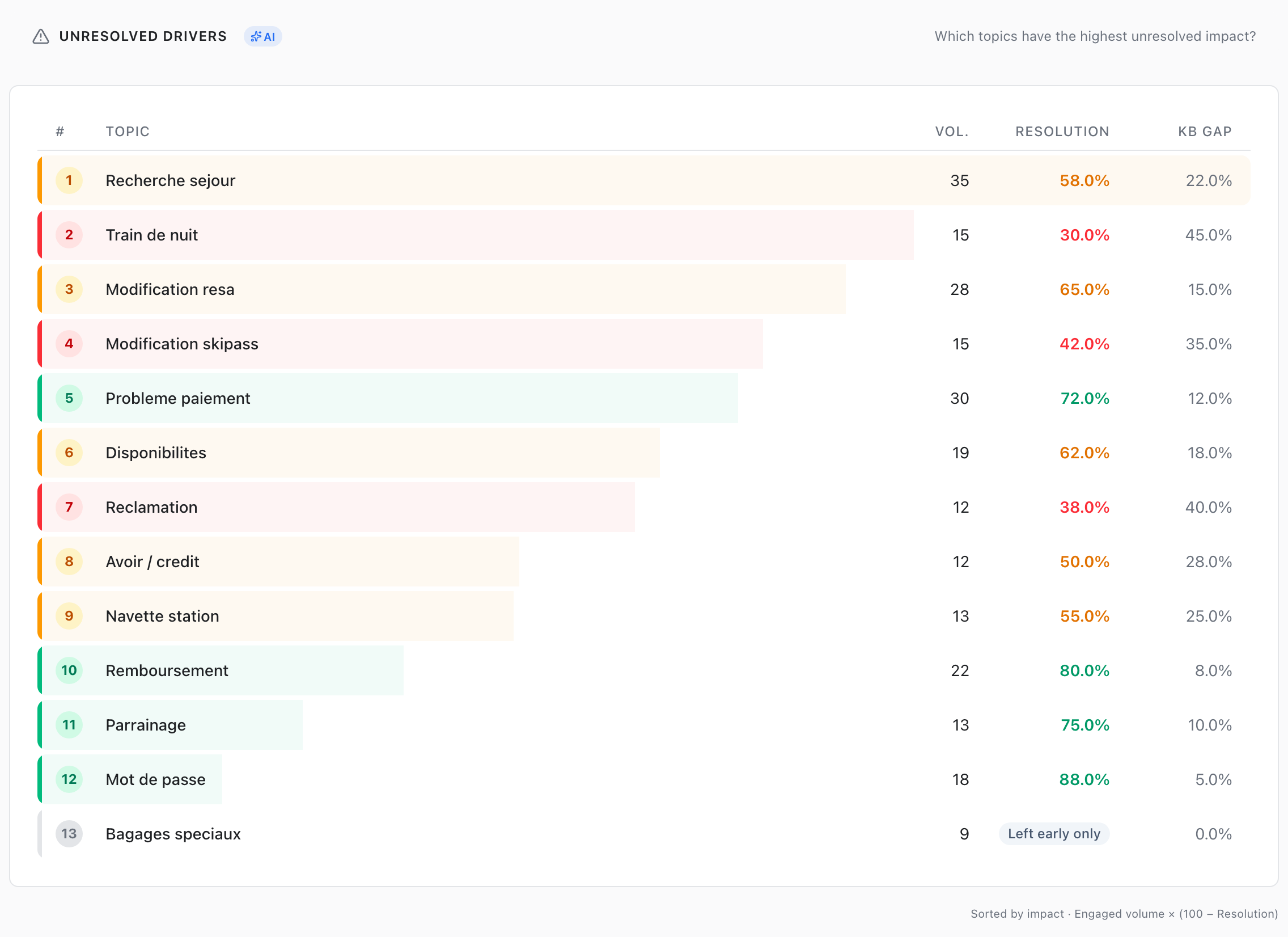
Go to Performance → Unresolved Drivers. Question at the top of the section: "Which topics have the highest unresolved impact?"
The table is already sorted for you:
Impact = Engaged volume × (100 − Resolution)
Engaged volume is the topic's Resolved and Unresolved conversations. Conversations where the user left early are not failures, so they don't push a topic up the list.
Understand what that formula is doing, because it's the whole trick. It ranks by wasted conversations, not by percentage.
- A topic at 5% resolution over 20 conversations looks catastrophic. It is worth 19 failures. It is noise.
- A topic at 55% resolution over 4,000 conversations looks acceptable. It is worth 1,800 failures. It is your problem.
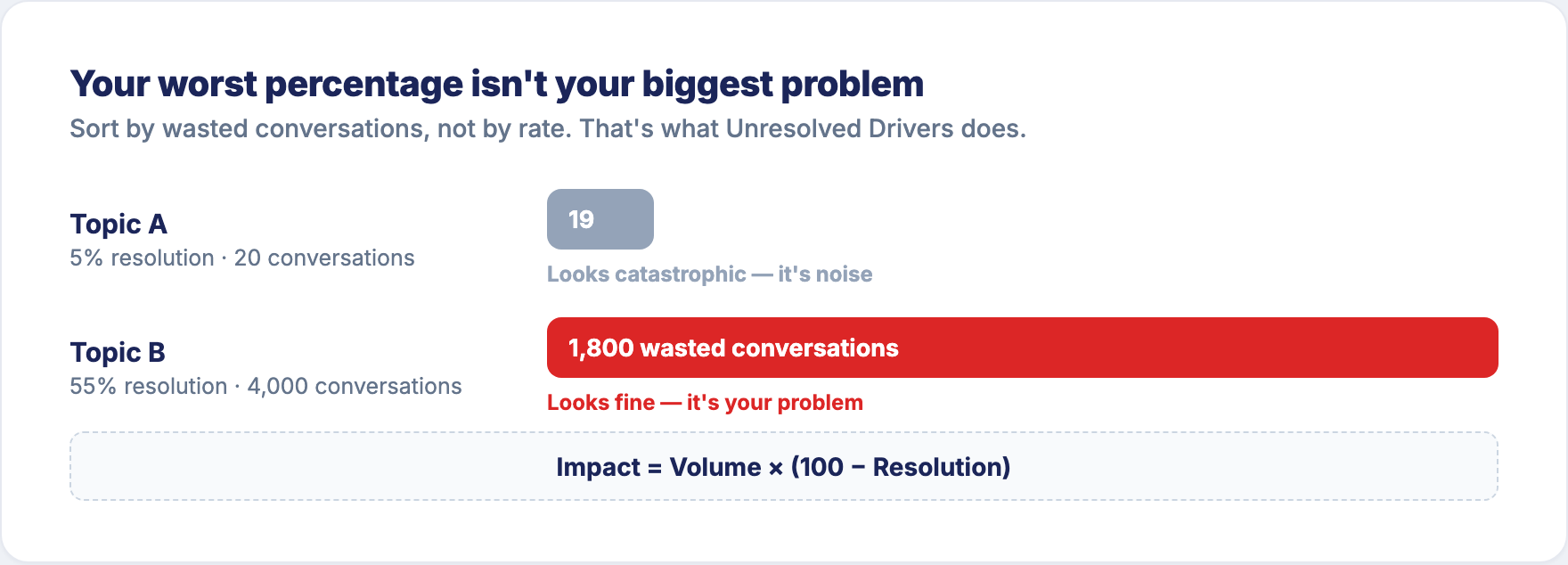
Percentages seduce you into fixing your worst-looking topic. Impact points you at your most expensive one. Start at the top of that table.
The same logic drives Sentiment → Dissatisfaction Drivers, sorted by Volume × (10 − CX) — same idea, on experience rather than resolution. That's the starting point for improving your CX Score.
2. Click it
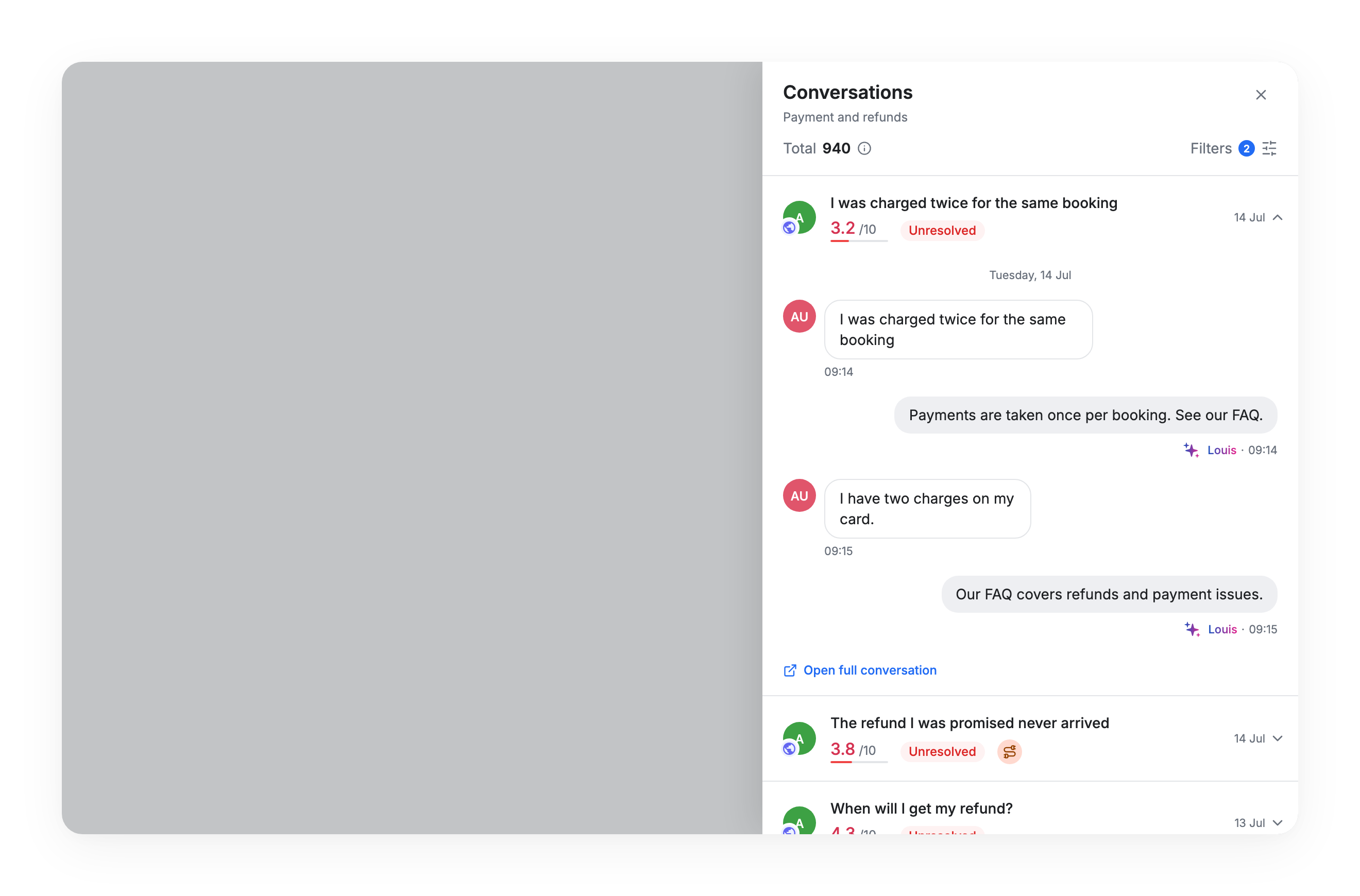
Click through to the conversations behind the number. A side panel opens, already filtered — that topic, unresolved conversations only. You can reach the real conversations from eight places in the dashboard: the Conversation Flow diagram, the Topics map, the Louis section, Satisfaction, Use Cases, and three points in Performance.
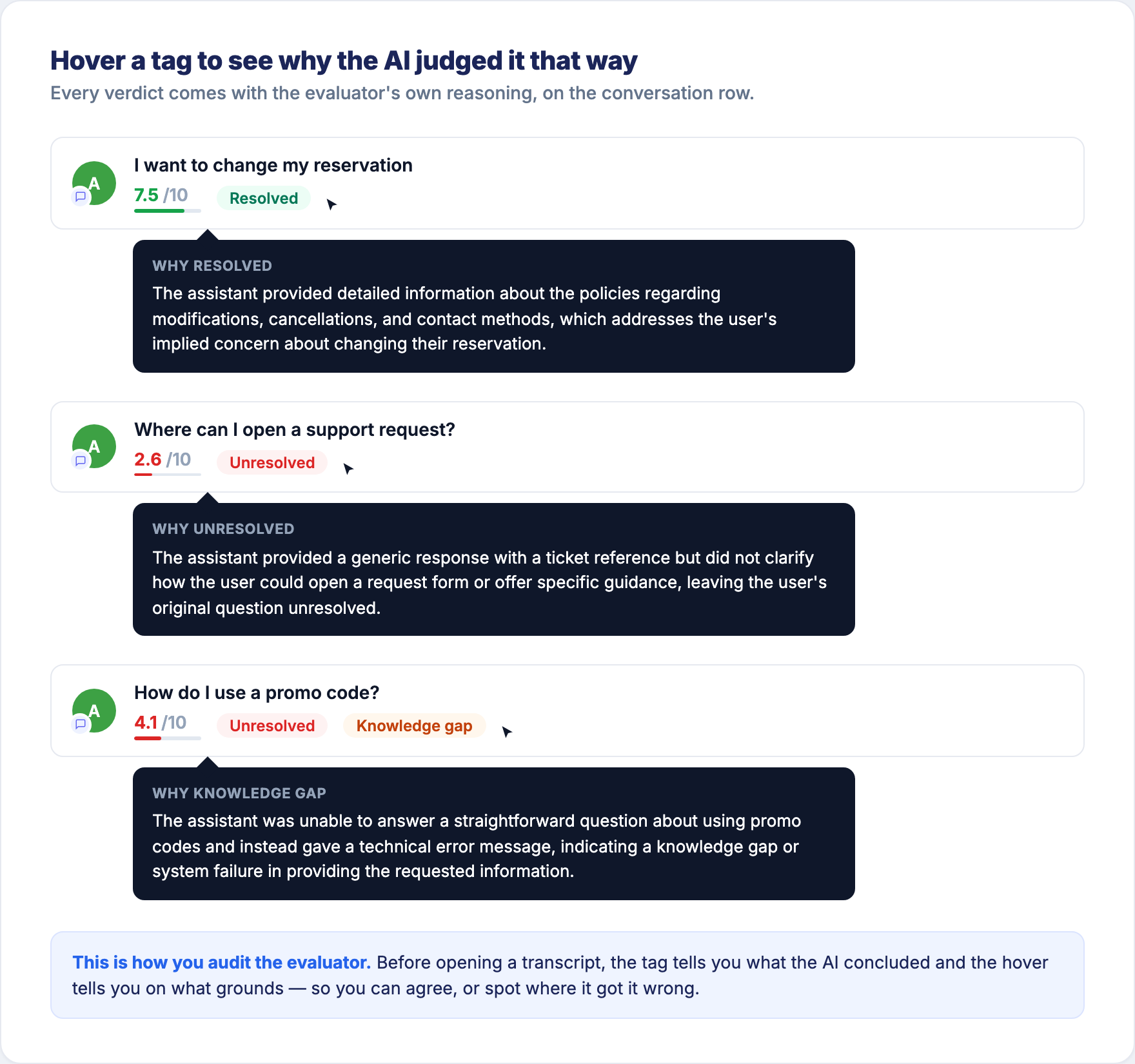
Each row carries its verdict as a tag. Hover a tag and the evaluator explains, in one sentence, why it judged the conversation that way — the fastest way to triage a filtered list before you start opening transcripts.
3. Read them
This is the step people skip.
Read twenty transcripts. The hover gives you the evaluator's reasoning; this step is about the real messages your real customers wrote. Twenty is enough. It takes fifteen minutes and it is never a waste of time.
You are looking for the pattern:
- Are they all asking the same missing thing? → Knowledge Base content. That's a knowledge gap.
- Is the bot misunderstanding the question? → intent and training.
- Is the bot understanding fine but the flow dead-ends? → flow design.
- Are they asking something your bot was never meant to handle? → route it, don't fix it.
- Is the bot right and the customers just don't like the answer? → that's a business decision, not a bot fix. Send it to whoever owns the policy.
That last one is real and common. Sometimes the correct conclusion is "the bot is fine". You can only reach it by reading.
4. Fix one thing
One topic. One cause. Resist the urge to fix five things at once — if you change everything, you learn nothing about what worked.
5. Come back in three weeks and look at the same number
Go back to Performance → Unresolved Drivers and find your topic's row again. Has its resolution moved? Has its volume moved? That's the same table you started from, so the comparison is like for like.
This loop — find, read, fix, re-measure — is the whole method. Not a redesign. Repetitions of this loop, one topic at a time.
Two patterns worth recognising
Big "Other", badly resolved. If Other is one of your top topics and resolves poorly, your topic list is missing something real. Read those conversations, then either run Run Discovery Now or add the topic manually. See Topics.
Low resolution, low knowledge gap. The bot has the information and the conversation still fails. So the problem isn't content. It's either the flow (the answer exists, the user never reaches it) or the answer is correct but the underlying service is what's disappointing them. Read ten transcripts and you'll know which within minutes — and the fix is somewhere other than the Knowledge Base.
AI vs scripted: where to add a Gen AI step next
Overview → AI Impact answers: "How does AI compare to scripted?" It shows the split between conversations handled by an AI step and conversations handled by scripted flows, then compares them on Resolution, Knowledge Gap, CX Score and CSAT. If a comparison doesn't have enough conversations behind it to be meaningful, the card tells you instead of showing a number you shouldn't trust.
This is the section to open before deciding where to put a Gen AI step next. It doesn't tell you what AI does in general — it tells you what AI does on your bot, on your topics, with your customers.
Read that comparison carefully
It compares two groups of conversations, not a controlled experiment. AI steps are not deployed randomly — they get enabled on specific use cases, often the ones that were already hard or already easy. So any gap you see mixes "what AI does" with "where AI happens to be deployed".
Treat it as a signal, not proof. And read it topic by topic rather than as one global number: the useful question is not "is AI better?" but "on which of my topics does it change the outcome?"
Updated 16 days ago