

Load the Widget After Cookie Consent
Keep the chat bubble visible at all times, but only load the ViaSay widget script once the visitor clicks it and has accepted the matching cookie category in your consent banner (CMP).
Keep the chat bubble visible at all times, but only load the ViaSay widget script once the visitor clicks it and has accepted the matching cookie category in your consent banner (CMP).
This is the recommended setup when your legal team classifies the chatbot as a functional cookie: the page never loads a ViaSay script, and never sets a ViaSay cookie, until the visitor has explicitly asked for the chat and consented to it.
When to use this mode
- Your CMP (OneTrust, Axeptio, Didomi, tarteaucitron, CookieFirst…) classifies the chatbot under a non-essential category.
- You want the chat entry point to stay visible even when cookies are refused, so visitors can still opt in later.
- You want zero ViaSay network requests before consent.
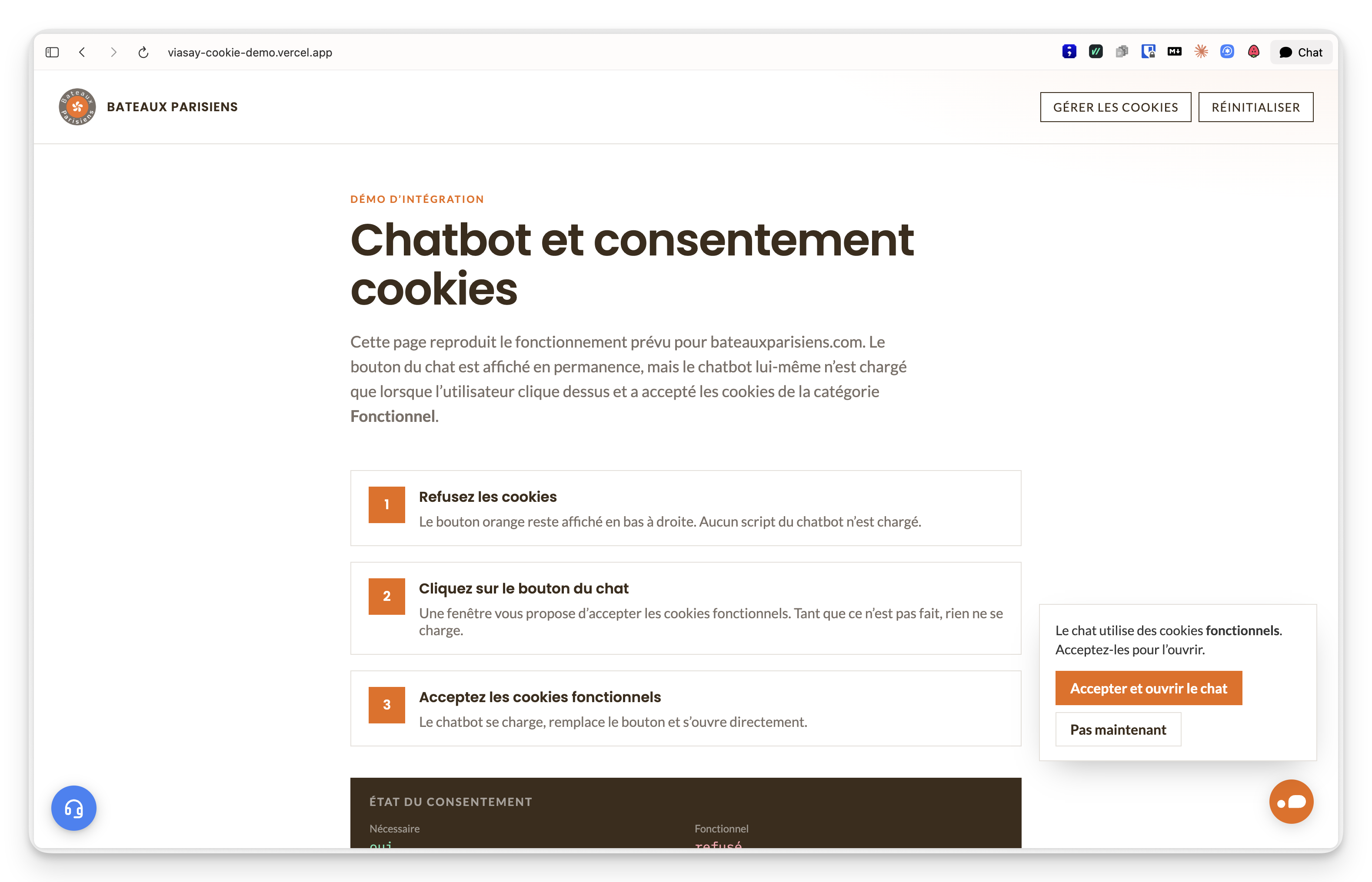
Live example: https://viasay-cookie-demo.vercel.app
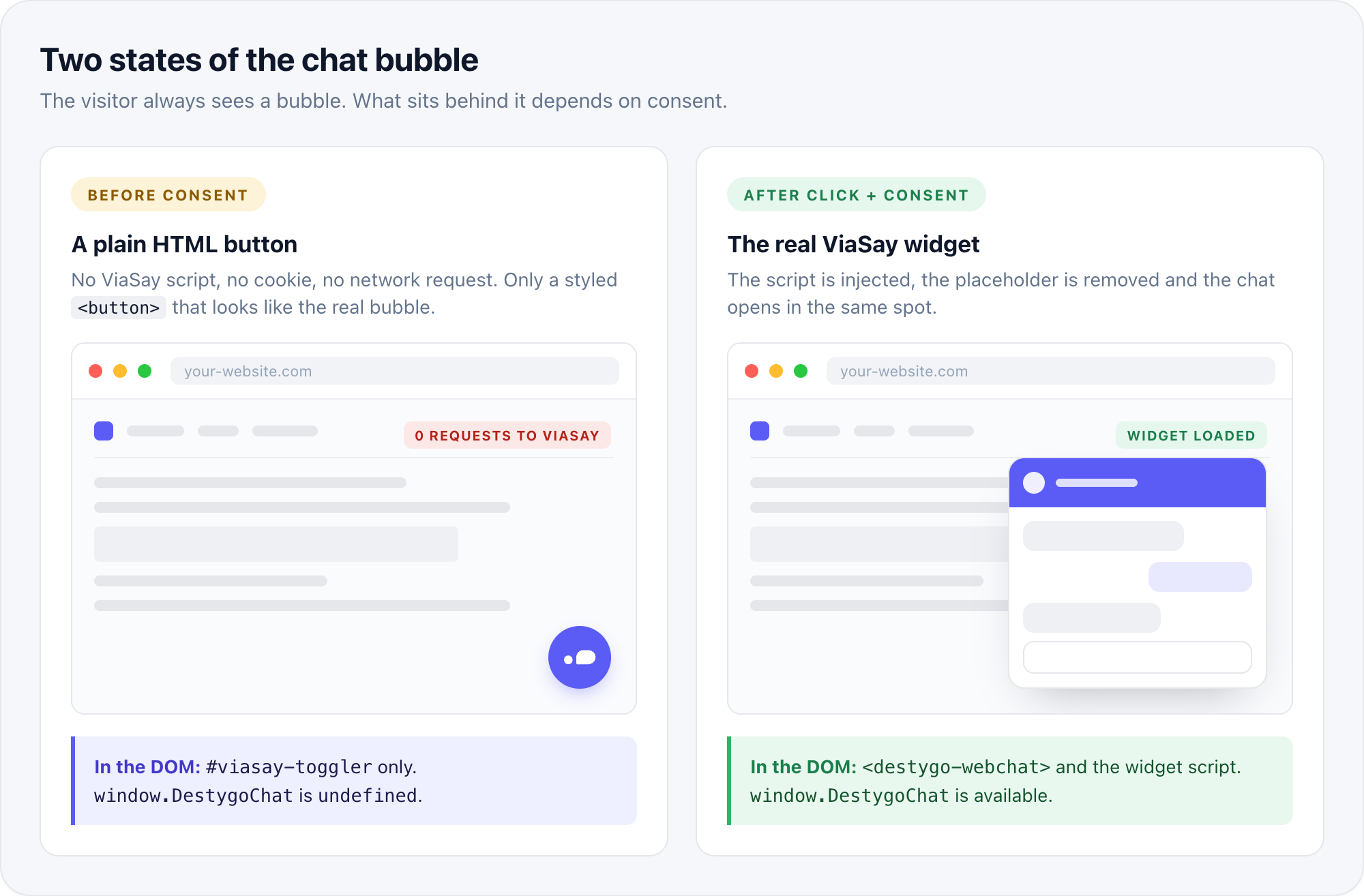
Two states of the chat bubble
Prerequisites
Your widget is configured in floating (bubble) mode
This guide assumes the default bubble widget. For an inline widget, apply the same gating logic to the container injection instead of the bubble.
Technical prerequisites
- Your widget token (available in Integrate → Web).
- Your widget script URL, e.g.
https://chatbot.viasay.io/widget/destygo-webchat.js. - A CMP that exposes a JavaScript API to read the current consent, open the preferences panel and notify on changes. All major CMPs do.
- The cookie category assigned to the chatbot in your CMP (usually Functional)
Do not use your CMP's automatic script blocking for this setup.
Declaring the widget script as a blocked script (for example class="optanon-category-C0003" with OneTrust, or type="text/plain" data-cookiefirst-category="functional" with CookieFirst) loads the widget as soon as the category is accepted, without waiting for a click. The snippet below handles both conditions itself.
How it works
- A plain HTML button styled like the ViaSay bubble is added to the page. It has no script behind it.
- When the visitor clicks it, the snippet checks the CMP for the chatbot's category.
- If the category is accepted, the widget script is injected and the chat opens.
- If it is not, the snippet remembers the click and opens the CMP preferences panel.
- When the CMP reports a consent change, the snippet loads the widget if the category is now accepted, or forgets the click otherwise.
- Once the widget has loaded, the placeholder button is removed and the real ViaSay bubble takes over.
!What happens when the visitor clicks the bubble
What happens when the visitor clicks the bubble
Installation
1. Remove the standard widget tag
If the widget is currently embedded with the standard tag, remove it from your pages (or from your tag manager). The snippet below replaces it entirely.
<!-- Remove this -->
<destygo-webchat id="destygo_widget" class="destygo_widget" token="YOUR_TOKEN"></destygo-webchat>
<script src="https://chatbot.viasay.io/widget/destygo-webchat.js"></script>
2. Identify your CMP's category and API
You need three things from your CMP. The table gives the values for the most common CMPs.
| CMP | Is the category accepted? | Open the preferences panel | Consent change callback |
|---|---|---|---|
| OneTrust | OptanonActiveGroups contains ,3, (group id of Functional) | OneTrust.ToggleInfoDisplay() | OneTrust.OnConsentChanged(cb) |
| Axeptio | axeptioSDK.getUserConsent().vendors.viasay (vendor name as configured) | axeptioSDK.openCookies() | _axcb.push(sdk => sdk.on('cookies:complete', cb)) |
| Didomi | Didomi.getUserConsentStatusForPurpose('functional') (purpose id as configured) | Didomi.preferences.show() | Didomi.on('consent.changed', cb) |
| tarteaucitron | tarteaucitron.state.viasay === true (service key as configured) | tarteaucitron.userInterface.openPanel() | Listen to tac.root_available, re-check on tac.close_panel |
| CookieFirst | CookieFirst.consent.functional | CookieFirst.openPanel() | window.addEventListener('cf_consent', cb) |
To find the OneTrust group id, open your site with the banner loaded and run OneTrust.GetDomainData().Groups.map(g => [g.CustomGroupId, g.GroupName]) in the browser console.
3. Add the snippet
Paste the following at the end of the <body> tag, or in a Custom HTML tag in Google Tag Manager fired on All Pages. Replace YOUR_TOKEN, check the script URL, and adapt the FUNCTIONAL_GROUP value and the bubble colour to your site.
The example targets OneTrust. See Common Implementation Patterns below for other CMPs.
<style>
  #viasay-toggler {
    --viasay-toggler-bg: #eb6a0a;
    position: fixed;
    right: 28px;
    bottom: 28px;
    z-index: 2147483000;
    width: 51px;
    height: 51px;
    margin: 0;
    padding: 0;
    border: 0;
    border-radius: 50%;
    background: var(--viasay-toggler-bg);
    color: #fff;
    cursor: pointer;
    display: flex;
    align-items: center;
    justify-content: center;
    box-shadow: 0 4px 20px -4px rgba(0, 0, 0, 0.25);
    transition: transform 0.3s cubic-bezier(0.34, 1.56, 0.64, 1);
  }
  #viasay-toggler:hover { transform: scale(1.05); }
  #viasay-toggler:active { transform: scale(0.95); }
  #viasay-toggler:focus-visible { outline: 3px solid #fff; outline-offset: 3px; }
  #viasay-toggler svg { width: 34px; height: 34px; display: block; }
  @media (max-width: 640px) {
    #viasay-toggler { right: 16px; bottom: 16px; }
  }
</style>
<script>
(function () {
  var TOKEN = 'YOUR_TOKEN';
  var SRC = 'https://chatbot.viasay.io/widget/destygo-webchat.js';
  var FUNCTIONAL_GROUP = '3';

  if (document.getElementById('viasay-toggler') || window.__VIASAY_GATE__) return;
  window.__VIASAY_GATE__ = true;

  var pending = false;
  var loading = false;

  var toggler = document.createElement('button');
  toggler.type = 'button';
  toggler.id = 'viasay-toggler';
  toggler.setAttribute('aria-label', 'Open chat');
  toggler.innerHTML =
    '<svg viewBox="100 227 235 107" aria-hidden="true" focusable="false"><g fill="#fff">' +
    '<path d="M199.458 330.31c-5.16-.624-6.826-3.572-6.815-8.005.041-15.991-.811-32.038.24-47.96 1.178-17.823 10.902-30.862 26.516-39.553 7.92-4.408 16.504-5.951 25.36-6.109 11.49-.204 22.987-.081 34.48-.036 26.654.104 48.387 17.83 51.836 44.254 3.444 26.38-13.2 51.094-41.323 56.476-5.122.98-10.234.968-15.378.968-24.82 0-49.64-.01-74.916-.035zM166.337 304.915c-3.882 14.954-14.775 24.837-29.302 25.248-15.835.447-28.468-8.733-32.329-24.645-4.671-19.256 10.06-38.048 30.25-38.667 15.775-.484 28.942 11.728 31.448 25.895.704 3.975 1.028 7.834-.067 12.169z"/>' +
    '</g></svg>';

  function hasFunctional() {
    return (',' + (window.OptanonActiveGroups || '') + ',').indexOf(',' + FUNCTIONAL_GROUP + ',') !== -1;
  }

  function openChat() {
    if (window.DestygoChat) window.DestygoChat.ToggleChat({ open: true });
  }

  function loadWidget() {
    if (window.DestygoChat) return openChat();
    if (loading) return;
    loading = true;

    document.addEventListener('destygo_widget_loaded', function () {
      loading = false;
      if (toggler.parentNode) toggler.parentNode.removeChild(toggler);
      openChat();
    }, { once: true });

    var el = document.createElement('destygo-webchat');
    el.id = 'destygo_widget';
    el.className = 'destygo_widget';
    el.setAttribute('token', TOKEN);
    document.body.appendChild(el);

    var s = document.createElement('script');
    s.src = SRC;
    s.async = true;
    s.onerror = function () {
      loading = false;
      if (el.parentNode) el.parentNode.removeChild(el);
      if (s.parentNode) s.parentNode.removeChild(s);
    };
    document.body.appendChild(s);
  }

  function onConsentChanged() {
    if (pending && hasFunctional()) {
      pending = false;
      loadWidget();
    } else {
      pending = false;
    }
  }

  toggler.addEventListener('click', function () {
    if (hasFunctional()) return loadWidget();
    pending = true;
    if (window.OneTrust && typeof window.OneTrust.ToggleInfoDisplay === 'function') {
      window.OneTrust.ToggleInfoDisplay();
    }
  });

  function bindOneTrust() {
    if (window.OneTrust && typeof window.OneTrust.OnConsentChanged === 'function') {
      window.OneTrust.OnConsentChanged(onConsentChanged);
    } else {
      window.addEventListener('OneTrustGroupsUpdated', onConsentChanged);
    }
  }

  function mount() {
    document.body.appendChild(toggler);
    bindOneTrust();
  }

  if (document.body) mount();
  else document.addEventListener('DOMContentLoaded', mount);
})();
</script>
What each part does:
hasFunctional()reads the CMP state. This is the only CMP-specific read.loadWidget()injects the custom element and the script, exactly like the standard tag, then listens fordestygo_widget_loadedto remove the placeholder and open the chat.pendingremembers that the visitor asked for the chat while consent was missing, so the chat opens automatically once they accept.bindOneTrust()subscribes to consent changes. If the visitor closes the panel without accepting,pendingis reset and nothing is loaded.- The
__VIASAY_GATE__guard makes the snippet safe to include twice (for instance when a tag manager fires it on virtual page views).
4. Match the bubble to your widget design
The placeholder button should be indistinguishable from the real ViaSay bubble so the switch is invisible to the visitor. Take the values from Format & Design in the ViaSay dashboard:
--viasay-toggler-bg: the toggler colour.width/height: the toggler size (51px by default).right/bottom: the toggler position (28px by default).
5. Declare the widget in your CMP
Add the widget domain (chatbot.viasay.io, or your dedicated domain) and its cookies to your CMP's cookie inventory under the same category used by hasFunctional(). This keeps your cookie policy accurate and lets the CMP's automatic scans recognise the widget.
Verification
- Open your site in a private window and refuse all non-essential cookies.
- Check that the bubble is visible and that no request to the widget domain has been made (Network tab, filter on
viasay). - Click the bubble: the CMP preferences panel must open, and still no widget request.
- Accept the chatbot's category and confirm: the widget loads, the placeholder disappears and the chat opens.
- Reload the page: the bubble is visible again and the widget is not loaded until the next click.
- Reset consent in the CMP and repeat once with Accept all on the banner: clicking the bubble must load the widget immediately.
In the console, window.DestygoChat must be undefined until step 4.
!What you should see at each step
What you should see at each step
Common Implementation Patterns
Other CMPs
Only three functions change. Replace hasFunctional(), the panel-opening call inside the click handler, and bindOneTrust().
Axeptio
function hasFunctional() {
  var c = window.axeptioSDK && window.axeptioSDK.getUserConsent();
  return !!(c && c.vendors && c.vendors.viasay);
}
// in the click handler
window.axeptioSDK && window.axeptioSDK.openCookies();
// instead of bindOneTrust()
window._axcb = window._axcb || [];
window._axcb.push(function (sdk) { sdk.on('cookies:complete', onConsentChanged); });
Didomi
function hasFunctional() {
  return !!(window.Didomi && window.Didomi.getUserConsentStatusForPurpose('functional'));
}
// in the click handler
window.Didomi && window.Didomi.preferences.show();
// instead of bindOneTrust()
window.didomiOnReady = window.didomiOnReady || [];
window.didomiOnReady.push(function (Didomi) { Didomi.on('consent.changed', onConsentChanged); });
CookieFirst
function hasFunctional() {
  return !!(window.CookieFirst && window.CookieFirst.consent && window.CookieFirst.consent.functional);
}
// in the click handler
window.CookieFirst && window.CookieFirst.openPanel();
// instead of bindOneTrust()
window.addEventListener('cf_consent', onConsentChanged);
Offer a one-click accept instead of opening the CMP panel
If you prefer a small prompt next to the bubble ("This chat uses functional cookies. Accept and open?") rather than the full CMP panel, call the CMP's programmatic accept for the category, then load the widget. With OneTrust:
OneTrust.UpdateConsent('Category', FUNCTIONAL_GROUP + ':1');
loadWidget();
The live example above uses this pattern.
Google Tag Manager
Create a Custom HTML tag with the full snippet, triggered on All Pages. No consent-mode trigger is needed: the snippet does its own check. If your GTM container itself is only loaded after consent, place the snippet directly in the page instead so the bubble is visible before any consent.
Troubleshooting
The bubble is visible but nothing happens on click.
The CMP API is not available on window under the expected name. Check the global (OneTrust, axeptioSDK, Didomi…) in the console, and make sure the CMP script is loaded before the visitor can click.
The chat opens as soon as cookies are accepted, without a click.
The widget script is still declared somewhere as a CMP-blocked script, or the standard tag was not removed. Search your pages and tag manager for destygo-webchat.
The widget never loads even after accepting.
hasFunctional() does not match the category. With OneTrust, verify the group id in OptanonActiveGroups after accepting; it may not be 3 on your configuration.
Two bubbles are visible.
The destygo_widget_loaded event did not fire, so the placeholder was not removed. Check the console for a widget error, and confirm the token is correct.
The bubble is hidden behind the cookie banner.
Expected while the banner is open. If the banner never closes on some pages, raise the z-index of #viasay-toggler above the banner's.
Advanced Options
- Open the chat programmatically: after the widget has loaded, use
window.DestygoChat.ToggleChat({ open: true })from any other link or button on the page. Before it has loaded, call the sameloadWidget()function. - Track opt-ins: push a
dataLayerevent insideloadWidget()to measure how many visitors accept the category from the chat prompt. - Delay the bubble: keep the placeholder hidden until the CMP is ready (
OneTrustdefined,cf_initfired…) if you want to avoid a click before the CMP can respond. - Multiple languages: the placeholder has no text, only an
aria-label. Translate it if your site is multilingual.
Updated about 2 months ago