

Conversation History
Conversation History gives your AI agent memory. When it's off, a Generate with AI step is stateless: the agent only sees the single input you pass to it, with no idea what was said two messages earlier. When it's on, ViaSay automatically hands the agent the previous messages of the conversation — so it can pick up references, remember what the user already told it, and stay consistent from one answer to the next.
You'll find it in the Advanced Settings of any prompt used by a Generate with AI step in the Flow Builder.
To use the Gen AI step, you must have configured Louis AI.
Why it matters
Without memory, your agent forgets everything between steps. The user says "Actually, make it the 15th instead" and the agent has no idea what "it" refers to. With Conversation History enabled, the agent sees the earlier turns and understands the context — exactly like a human agent who read the start of the chat.
Concretely, memory lets your agent:
- Resolve references — understand "the same one", "that order", "like I said" without re-asking
- Stop repeating questions — reuse information the user already gave earlier in the conversation
- Stay consistent — keep the same tone and facts across several AI-generated answers
The history is injected automatically — you don't need to add any variable to your prompt.
What the agent actually receives
When the step runs, ViaSay builds the conversation history as an ordered list of messages. Each message has a role (user for the customer, assistant for the bot) and its content. That list is prepended to the prompt before the model generates its answer.
For example, if the conversation so far was:
Customer: Hi, where is my order?
Bot: Sure! What's your order number?
Customer: It's AB-4021.
then the agent receives this history alongside the current step:
[
  { "role": "user", "content": "Hi, where is my order?" },
  { "role": "assistant", "content": "Sure! What's your order number?" },
  { "role": "user", "content": "It's AB-4021." }
]
So when the next user message triggers your Gen AI step, the agent already knows the order number is AB-4021 — it doesn't ask again.
If Include Tool Calls is enabled (see below), the actions the agent took are woven into the same history — the tool it called, the arguments it sent, and the result it got back:
[
  { "role": "user", "content": "Hi, where is my order?" },
  { "role": "assistant", "content": "Sure! What's your order number?" },
  { "role": "user", "content": "It's AB-4021." },
  {
    "role": "assistant",
    "tool_calls": [
      { "name": "track_order", "arguments": { "order_id": "AB-4021" } }
    ]
  },
  {
    "role": "tool",
    "name": "track_order",
    "content": { "status": "shipped", "eta_days": 2 }
  }
]
Now the agent doesn't just remember what was said — it also remembers that it already looked up order AB-4021 and that the result was shipped, ETA 2 days, so it won't call the tool again or contradict itself.
Enable Conversation History
- Open your use case in the Flow Builder and select the Generate with AI step.
- Open your prompt with Edit & Test prompt.
- Open the Advanced Settings panel.
- Toggle Conversation History on.
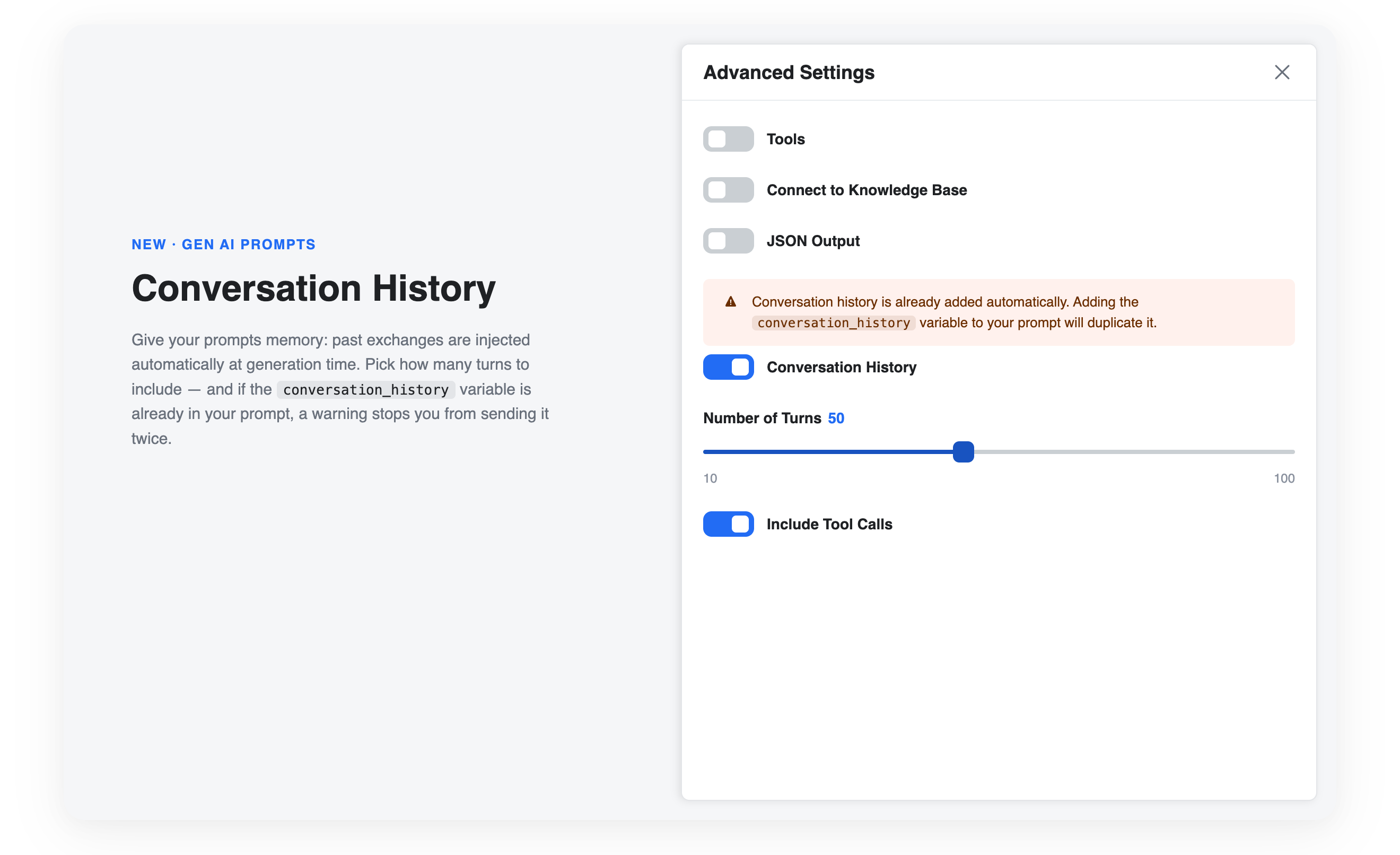
Two options appear once the toggle is enabled.
Number of Turns
Controls how far back the memory goes — how many of the most recent conversation turns are included. Use the slider to pick a value between 10 and 100 turns. The default is 50.
Finding the right value
More turns means more context, but also a longer (and more expensive) prompt. If your use case only needs short-term context — like resolving a follow-up question — a lower value is usually enough. Raise it for long, multi-topic conversations where earlier details still matter.
Include Tool Calls
By default, the history contains the messages exchanged with the customer. When Include Tool Calls is on, the actions your agent took during the conversation are added to the history as well — the tools it called, their arguments, and their results — as shown in the second example above.
This gives the agent memory of what it already did, not just what was said, so it can reuse a result instead of calling the same tool twice or contradicting an earlier lookup.
Enable it when your prompt needs to reason about the actions already performed in the conversation; leave it off if you only need the spoken back-and-forth.
Avoid duplicating the history
The history is added automatically when the toggle is on. If your System Prompt or User Prompt also references the conversation_history variable, the same content would be sent twice — wasting tokens and cluttering the prompt.
ViaSay detects this and shows a warning in the Advanced Settings panel and next to the prompt field concerned:
Conversation history is already added automatically
Adding the
conversation_historyvariable to your prompt will duplicate it.
To fix it, either remove the conversation_history variable from your prompt (recommended — the automatic injection replaces it), or turn the Conversation History toggle off and keep managing the history manually through the variable.
Works with drafts and versions
The Conversation History settings are saved with your prompt and follow the Prompt Versioning lifecycle: changes made on a draft don't affect the production prompt until you publish your use case.
Updated 3 months ago