

How the Evaluation API works
With the Evaluation API, a program talks to your bot as a customer would and reads each answer, so your team checks the bot automatically instead of typing questions in the widget by hand. ViaSay runs the conversation; your program compares each answer with what you expected and decides pass or fail.
What you can test
You test your bot at two moments, and choose the version for each test:
- Before you publish a change: the
draftversion plays the last saved version of your use cases, published or not. - After you publish: the
liveversion plays the use cases published on the environment of the application (in production, the ones your customers talk to), to check that what used to work still works.
Each test talks to the whole bot as on your widget (the bot picks the use case), to one use case, or to Louis, the AI assistant.
A test is a scenario: a conversation written in advance, for example "I want to change my dates" then a booking number. Your developer replays hundreds of scenarios in a few minutes, as often as needed, up to 20,000 test conversations a month per environment.
What comes back
For each scenario, the results go to your developer's tools, not to the ViaSay dashboard:
- the bot's answers, word for word, with their buttons;
- the use case that answered, or Louis;
- how the conversation ended: answered, waiting for the customer, handed to an agent, or in error.
What is real and what is simulated
Tests never reach your customers, your agents, your ticketing tool or Analytics. But when your bot calls your own systems (orders, bookings, CRM), those calls are real.
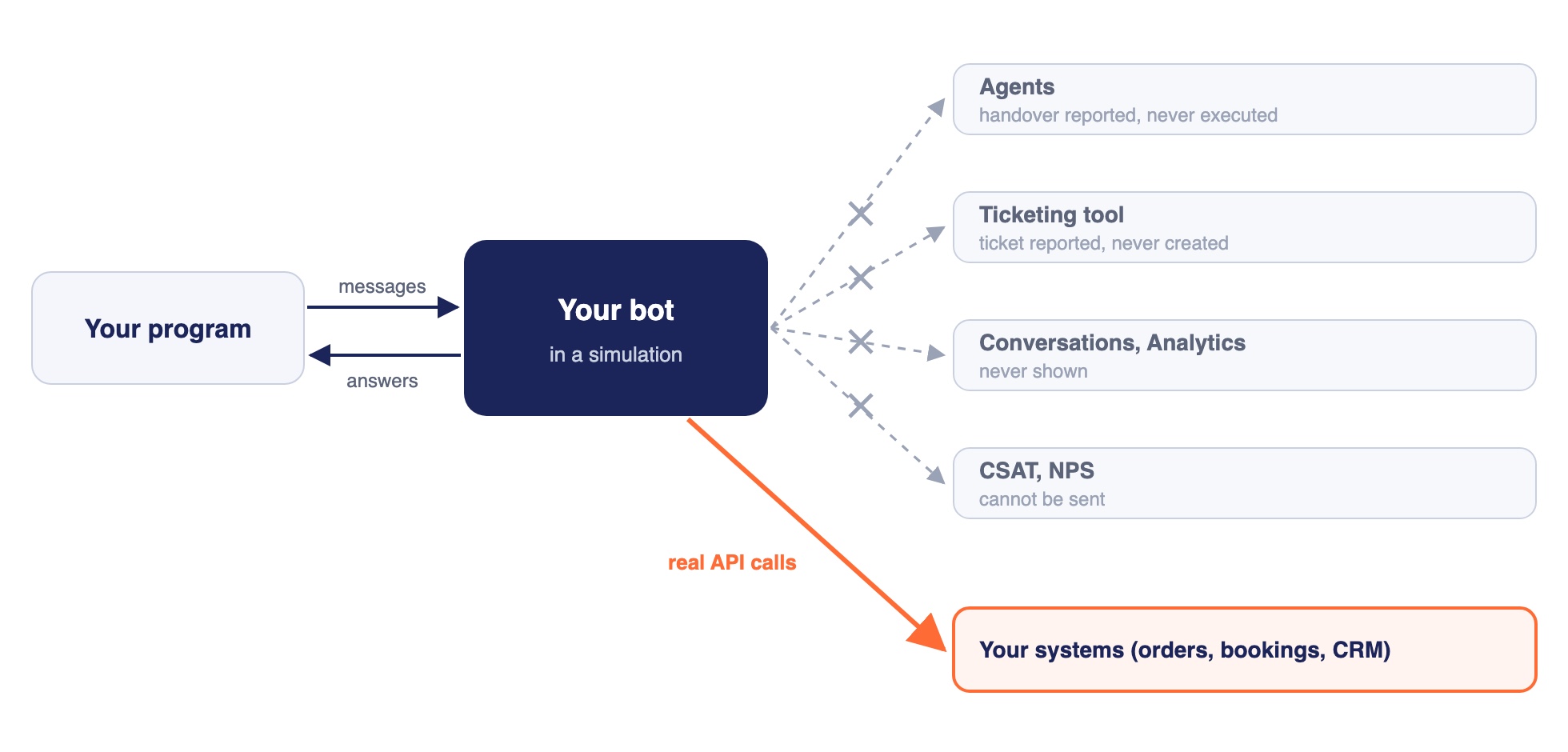
The table below says what happens to each action of the bot during a test.
| Action of the bot | During a test |
|---|---|
| Handover to an agent | reported in the results, never executed |
| Ticket creation | reported in the results, never created |
| File sent by the customer | simulated: only its name is sent |
| CSAT or NPS rating | the bot can ask for it, the test cannot answer it |
| Conversations and Analytics | tests never show there: your figures stay clean |
| Calls to your systems | real: API Call steps of your use cases, API tools of Louis and of the Generate with AI steps |
Important: if your bot calls your systems, check with your developer that, on the environment you test, those calls go to test versions of your systems. Otherwise a test can really cancel an order.
Give your developer access
- In Settings › Applications, click Create an application and tick its scopes, the rights of the program. Only Managers see this tab: see Applications.
- Create it on the environment you want to test, test or production: an application only opens the environment you are on when you create it.
- Send the client ID and the secret to your developer through a password manager, never by email.
- Send your developer the questions to protect, with the use case that should answer each one. A spreadsheet is enough.
Next steps
- Applications: create the access for your developer.
- Your first test in 5 minutes: the first steps of your developer.
Updated about 1 hour ago