

[LEGACY] APIs
Connect your bot to external systems or Knowledge Bases
In the API section, you can create and manage APIs to:
- perform operations with external systems (getting info, posting updates etc.)
- fetch data from Knowledge Bases that will be used by the bot.
APIs used within the bots flows to fetch and manipulate data from your internal systems or from any third party you work with, or from your bot's Knowledge Bases.
Watch an example in this video tutorial.
Index
All APIs are listed under API groups, which are basically folders to organize them.
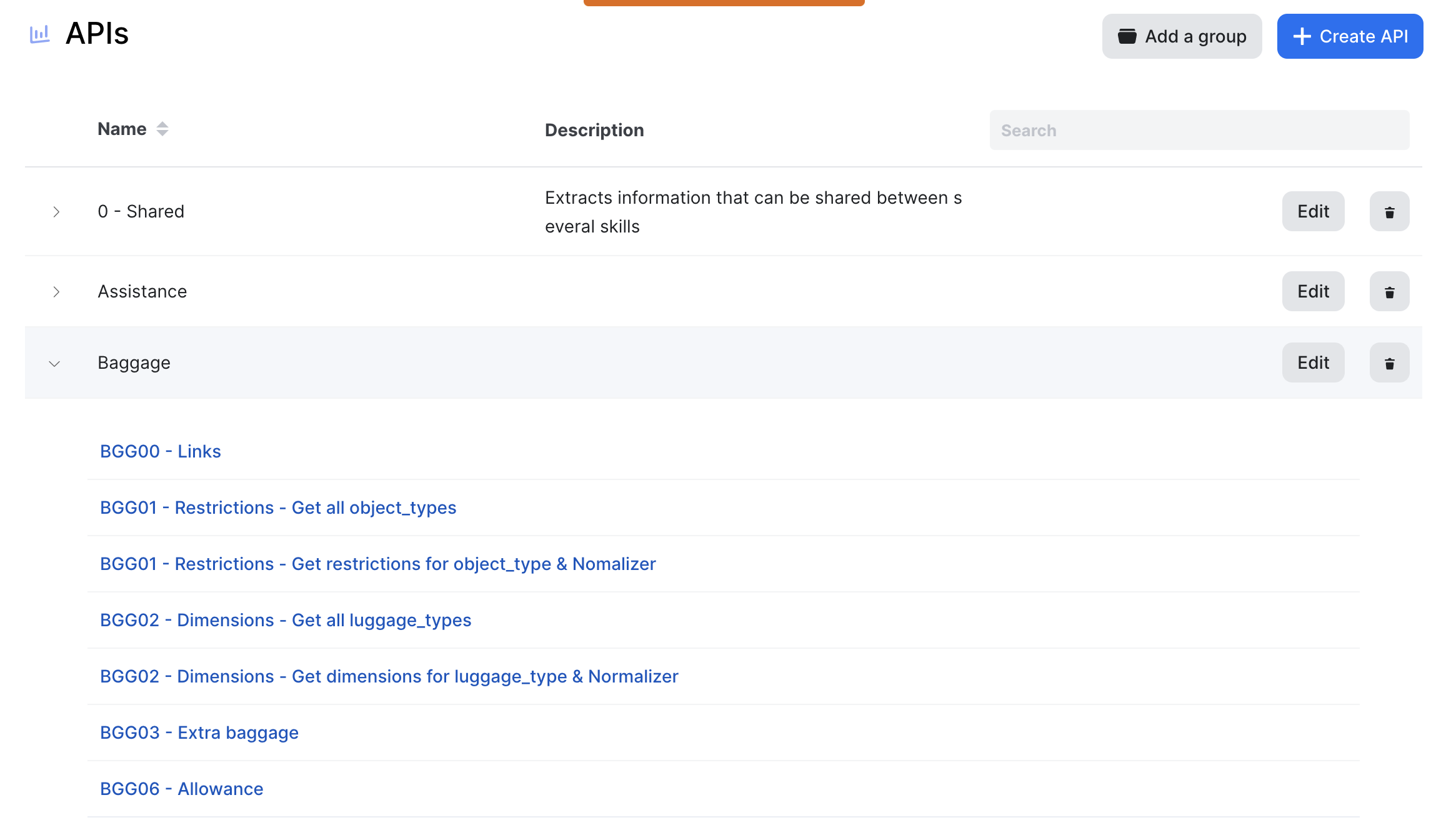
List of API groups with the Baggage API group open displaying the list of APIs.
Click on Add a group to create a new folder. "Edit group" allows you to modify group name and description. A group can be deleted, but pay attention that APIs belonging to this group will also be deleted.
Actions
When entering an API, the burger menu on the top right uncovers options to duplicate or delete it.
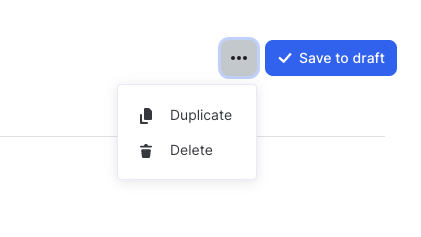
Note that you can duplicate an API in another bot instance.
Request
Name
Provide an explicit name to your API describing what it will do. It'll be easier to identify which API to call within a conversational flow.
Linked Bot Action
This field indicates the Bot Actions where this API is used.
When editing an existing API, it impacts all the bot actions where it is linked
API group
Select a group where the API will be listed.
API type
Select among the available types:
- External API: call to an external web API
- Knowledge Base: call to an internal Knowledge Base
URL
URL of the service to be called.
This field supports Jinja script to insert variables.
HTTP method
The method to call your API: GET / POST / PUT / PATCH / DELETE
Data Format
The format of your query result: JSON or XML.
Even if the API outputs XML, it is directly be transformed into JSON by the Laiye platform.
Caching
This is the frequency to update results that are cached. If you specify 15 min, the API won't be called again within the next 15 minutes after the first call since the request is the same (same headers and same URL).
Headers
Add HTTP headers to the API call.
The expected format is a JSON with headers keys and values. For example, use this JSON to add a Content-Type and an Accept-Language header. This field supports Jinja to insert variables or vary the elements depending on context.
Inputs
Select and name here the variables that you will need to execute your API call.
The "description" field lets you leave a sample of what the input looks like, which is useful when the input is a complex JSON object.
Extractions
The output/extractions contain the value that you want to use in your answers
Thanks to JMESPath, you can isolate the information you want. You can use the Parsing Helper to test your extractions.
In this field you can use Jinja and JMESPath combined : the Jinja will be executed first to generate the JMESPath expression that will be executed after.
The extractions are applied directly on the API result.
With output parameter:
- if checked: the result of the extraction will be added to the user context
- if unchecked: the result of the extraction can be used for the following extractions of the same API but won't appear in the user context and so cannot be used outside the API
Troubleshooting
Here are some reasons that could make your API call fail.
The target API is protected against unknown IP addresses
Some APIs need the Laiye Chatbot backend IP addresses to be whitelisted. Here is the list of IP addresses that you (or your API provider) need to whitelist.
# eu-central-1 (Frankfurt)

## Required
35.157.144.121
35.156.233.204
35.157.137.108

## Optional: Allow our team to run some tests outside the platform
18.195.231.58
18.184.19.99

# eu-west-3 (Paris) / recovery region

## Required
15.236.118.129
15.236.228.240
15.236.216.97

## Optional: Allow our team to run some tests outside the platform
15.236.76.36
The target API doesn't allow a Python User-Agent
By default, the Laiye Chatbot backend sets a Python user-agent as User-Agent HTTP header (such as User-Agent: python-requests/2.22.0). Some APIs won't allow this kind of user-agents.
Possible workarounds:
- set a browser user-agent in the API configuration of your Laiye bot
- ask the API provider to authorize Python user-agents
The target API takes time to respond
The Laiye Chatbot backend will abort the call if the target API takes:
- more than 4 seconds to acknowledge the connection.
- more than 16 seconds to send its answer
API answer weight limitations
🔴 Weight > 650kb
Laiye do not handle API calls. Make sure your API call is under to be working.
🟠 150kb < Weight < 650kb
The API answer is not traced but will be run. However this is considered abnormally big, you should try to reduce the size for performance / bandwidth.
🟠 50kb < Weight < 150kb
The API is not traced but will work. Your Api call might just be on the big side. This is considered normal on some specific cases.
🟢 Weight < 50kb All good, will be run and traced
Updated almost 2 years ago