

Once a conversation is opened between a end-user and a human agent, replies from agents can be routed to the end user through this endpoint.
| Time | Status | User Agent | |
|---|---|---|---|
Retrieving recent requests… | |||
Details
There are 4 types of events that can be sent:
- Room events: used to update the end-user about the state of the conversation.
- Typing events: used to show a typing indicator to the end-user.
- Messaging events: used to send a reply from the human agent to the end-user.
- Closing event: used to close the handover and route the end-user back to the chatbot.
Room events
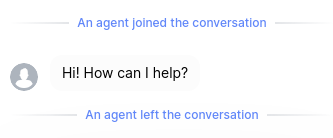
Room events are events with the type agent_joined or agent_left.
They are used to indicate to the user when a human agent joins or leaves the conversation.
These are the blue notifications in the following example from Laiye web widget:
Typing events
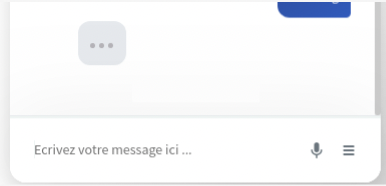
Typing events are events with the type typing_on or typing_off.
They are used to display a typing indicator to the end-user.
The following display example is from Laiye web widget:
Messaging event
Messaging events are events with the type message_sent.
They are used to send replies from human agents back to the end-user.
Closing events
Closing events are events with the type handover_terminated.
Once the scenario needing human assistance is completed, a closing event should be sent by the agent to complete the handover and redirect the end-user back to the chatbot.
Sending a closing event will automatically trigger an "agent_left" event to inform the user that the handover is terminated.
After the closing event is sent for a end_user_token, messages from the user will not be sent to the human agent platform anymore (or not until the user requests a new handover, which will start a new handover protocol from the first step of creating a new conversation on the human agent platform).