

A Redesigned Analytics & AI Quality Monitoring
This release replaces the Analytics dashboard with a redesigned one, and adds AI Quality Monitoring: every completed conversation is now read and assessed by an AI evaluator. You can see what your bot resolves, what it misses, and what people actually talk about.
A redesigned Analytics
The Analytics dashboard has been rebuilt. Same place in the platform, new structure: five tabs, each one answering a question about your bot instead of listing raw counters.
The ROI tab is not part of the redesign. If you were using it, talk to your Customer Success Manager — we'll make sure you get the numbers you need.
- Overview: Conversation Flow, Health, AI Impact, Volume, Louis, Topics
- Conversations: Engagement, Users, Activity, Sources
- Use Cases: Overview, Metrics over time, Detailed performance, Needs attention
- Sentiment: Satisfaction, CSAT by Knowledge Source, Dissatisfaction Drivers, CSAT Report, NPS
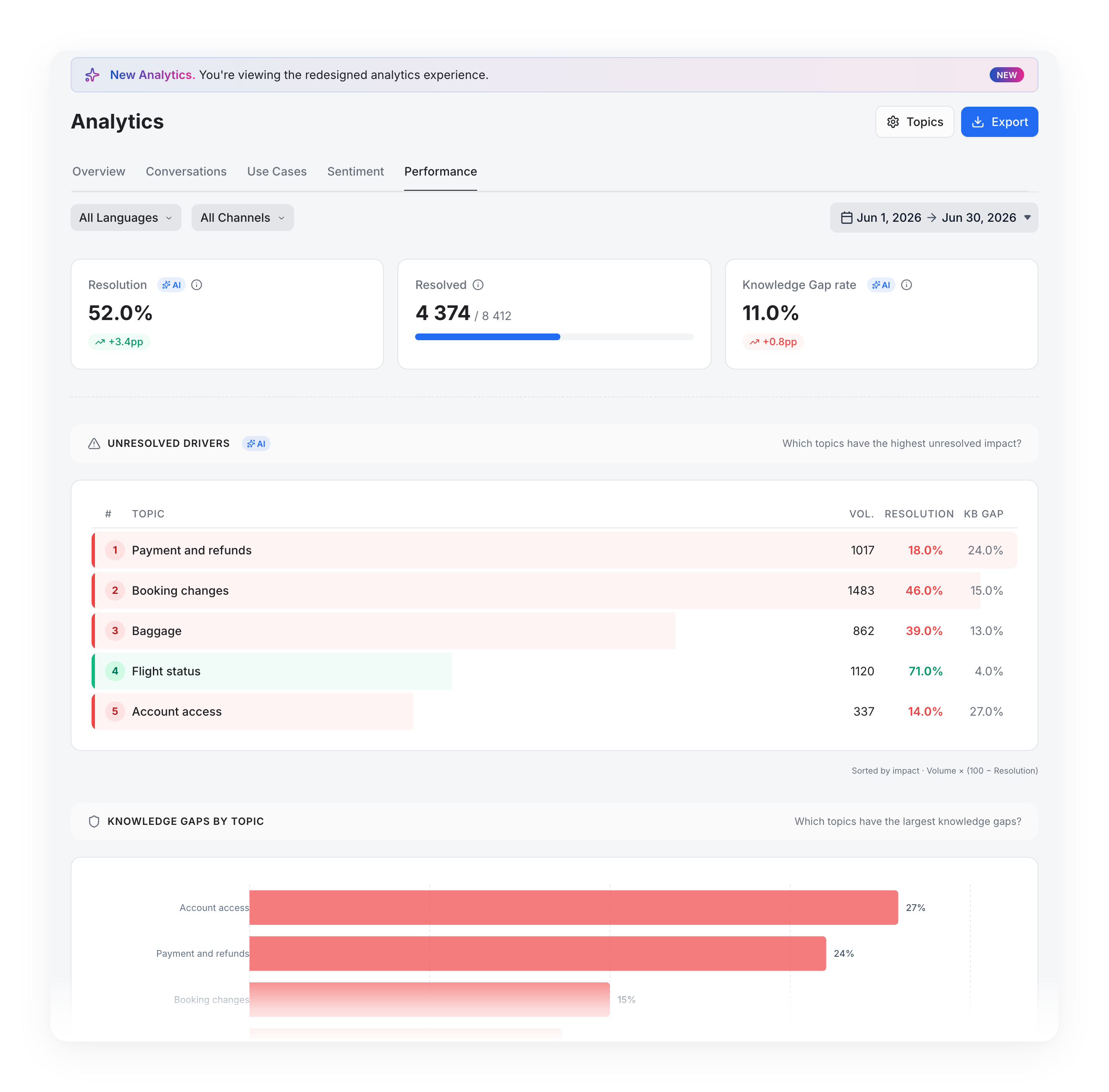
- Performance: Unresolved Drivers, Knowledge Gaps by Topic, Article Performance
Filters apply across the whole dashboard: Languages, Channels, and a date range with Daily, Weekly or Monthly granularity.
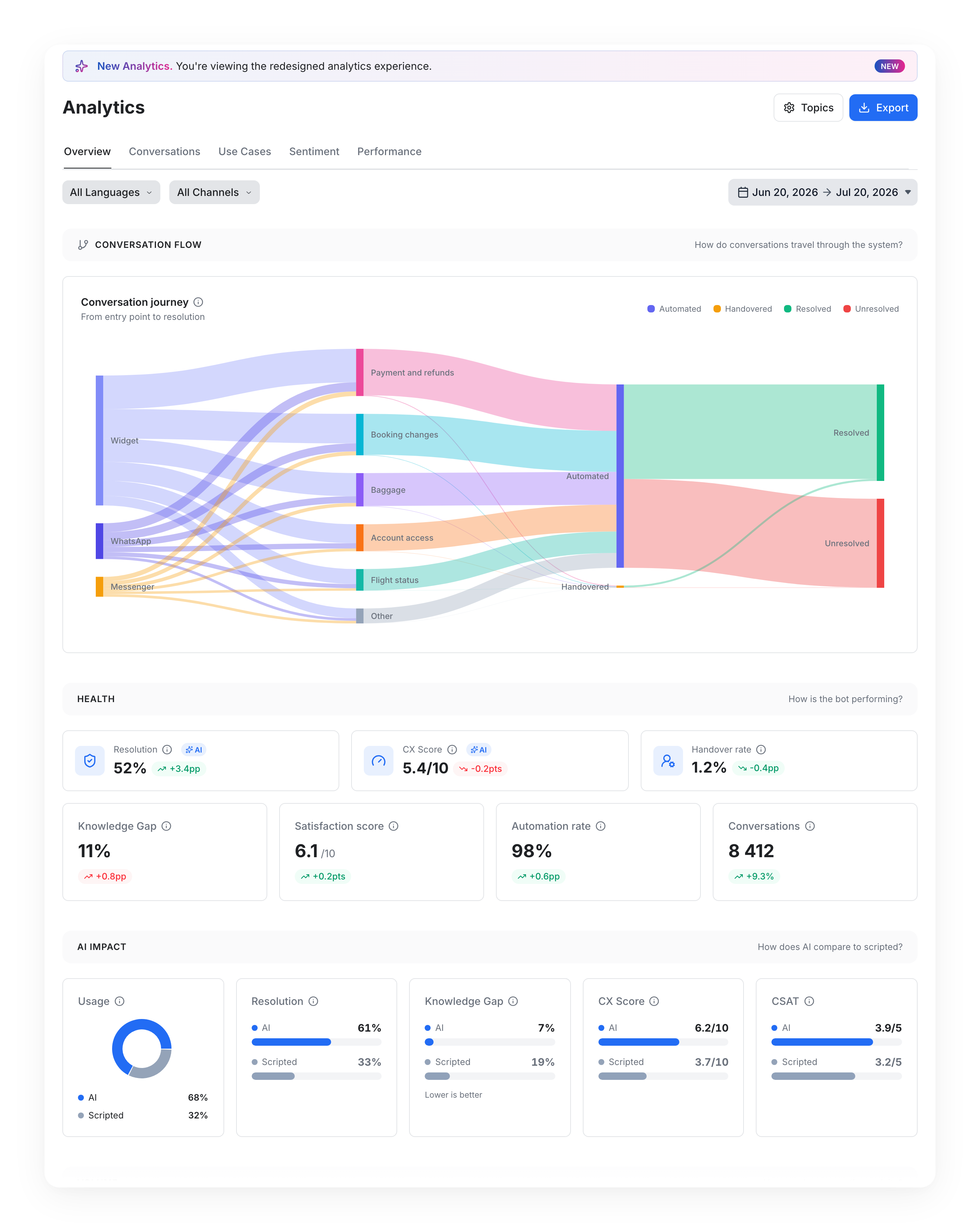
New indicators. What wasn't there before:
- Conversation Flow: a flow chart that follows your conversations from start to finish — entry channel → topic → treatment (automated or handed over) → final outcome. Each band is a path through your bot; the thicker the band, the more conversations took it.
- AI Impact: how AI-powered conversations compare to scripted ones, on your own data — Usage, Resolution, Knowledge Gap, CX Score and CSAT, side by side.
- Activity: conversations by hour and day of week, as a heatmap. Useful to size staffing and spot your real peaks.
- Users: Total users, New users, Returning users, Convs / user, and users over time.
- Starting URLs: which pages of your website actually trigger conversations.
- Article Performance: how each knowledge base article performs — Triggers, CSAT, Resolution, CX Score, KB Gap.
- Automation rate: the share of conversations handled without handing over to a human agent.
- Unresolved Drivers: the topics where unresolved conversations cost you the most — not where the percentage looks worst, but where the failures pile up in real numbers. Ranked by volume × unresolved rate (shown in the app as Volume × (100 − Resolution)).
- Dissatisfaction Drivers: the same idea applied to experience — the topics where a poor CX Score (explained below) hits the largest number of conversations. Shown as Volume × (10 − CX).
- Export: download the data behind any tab.
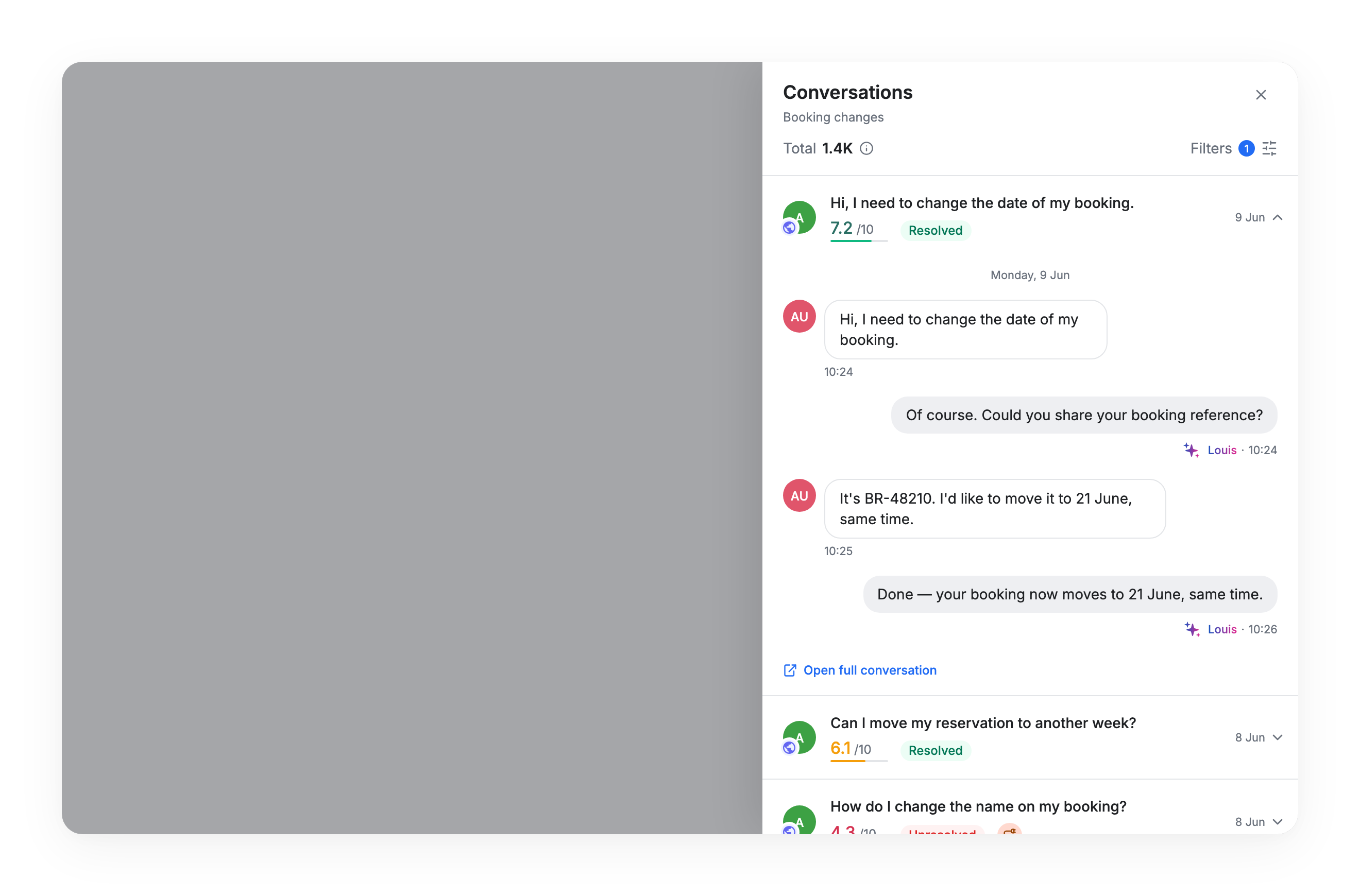
- Drill down to conversations: click a number, read the conversations behind it. Available from the Sankey, the Topics treemap, the Louis section, Satisfaction, Use Cases and Performance.
AI Quality Monitoring
Until now, you could count conversations. You couldn't judge them. Resolution was inferred from what the bot did — whether a flow completed, whether a human took over. Nobody read the conversations. That's what changes here.
Your bot's quality is now measured, conversation by conversation. When a conversation ends, an AI evaluator reads the full transcript. It answers four questions: what was this about, was the request handled, did the bot lack information, and how did the customer experience it.
This runs in the background. It never touches your bot, your flows, or the customer experience.
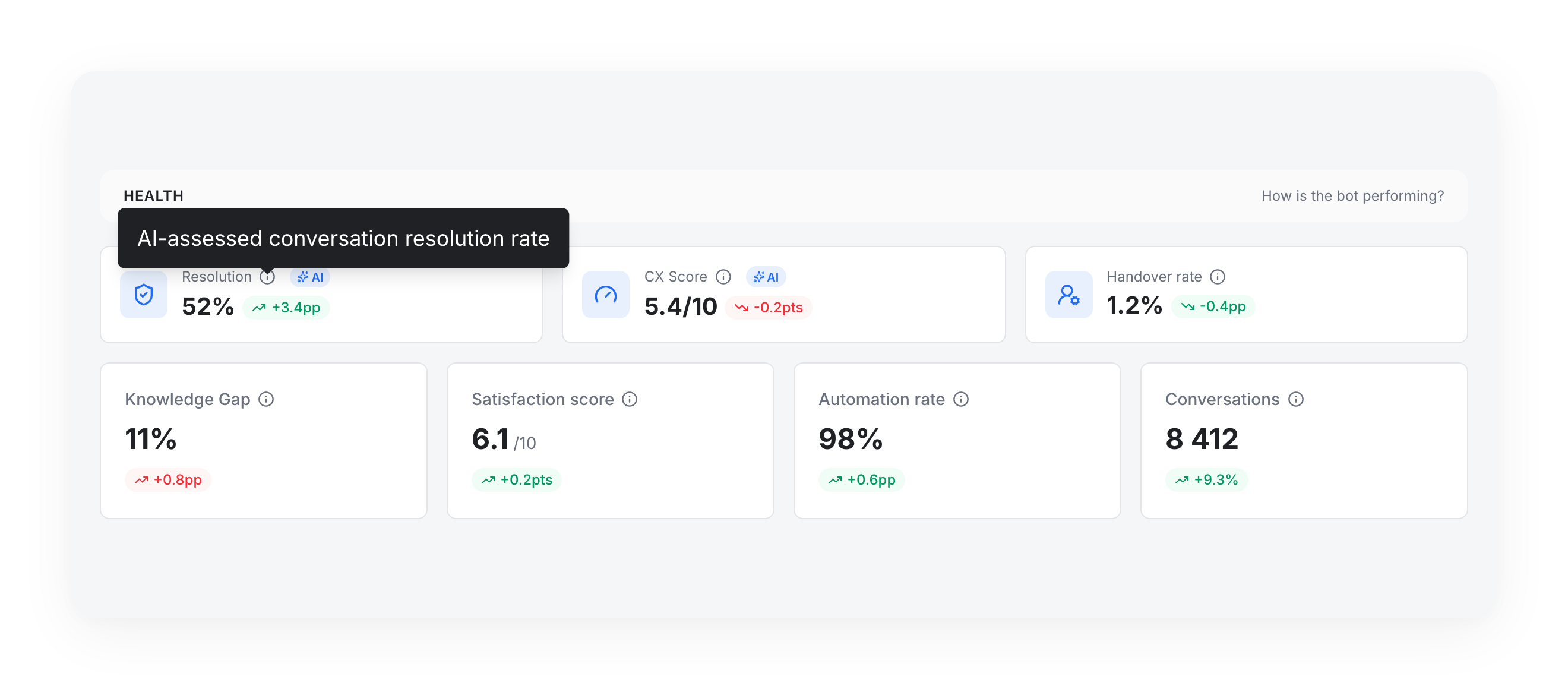
AI Resolution — was the request handled?
The evaluator judges one thing: did the customer get what they came for? Not whether the bot did it alone.
Counts as resolved:
- The bot answers the request directly.
- The bot identifies the need and points to a valid, specific resource aligned with the problem.
- The bot escalates to a human agent, and the agent handles the request in the conversation.
- The bot correctly identifies that the request requires contacting support, and says so clearly — when that genuinely is the right process.
- The customer asks for a human and the bot gives a concrete way to reach support: a phone number, an email, a link.
Counts as unresolved:
- Generic, unhelpful or off-topic answers.
- The bot misses the intent and answers a different question.
- The customer asks for a human and the bot refuses, with no alternative and no next step.
- The bot pushes the customer to support when it could have handled the request itself.
- The conversation just ends — no answer, no clean escalation.
Two things worth knowing:
- A correct escalation is a success, not a failure. AI Resolution is not the same as Automation rate. Automation rate measures what happened without a human. AI Resolution measures whether the customer's problem got handled — including by a human agent.
- The customer's mood is not part of it. A refund policy stated correctly is resolved, even if the customer is unhappy about the policy. Frustration is measured separately, in the CX Score.
CX Score — how the conversation went, 0 to 10
The CX Score answers a different question: how the conversation felt for the customer, on a scale of 0 to 10. The AI doesn't grade this directly. It's three measurements, weighted and added up:
- 40% Resolution — was the request handled?
- 30% Sentiment — what the customer expressed: satisfaction, politeness, frustration signs.
- 30% Effort — how hard the customer had to work: repeating or rephrasing the same request costs points.
CX Score is not CSAT. CSAT is a real vote from a real customer — thumbs up or thumbs down. CSAT is unchanged: it still comes from real user votes, and you'll find it in the Sentiment tab as well as alongside the AI metrics in AI Impact, Louis and Article Performance. CX Score is an AI estimate, computed on evaluated conversations — including those where nobody voted. Read them together: they answer different questions.
Topics — what people talk about
Every conversation is classified into one topic, picked from your list — not invented on the fly.
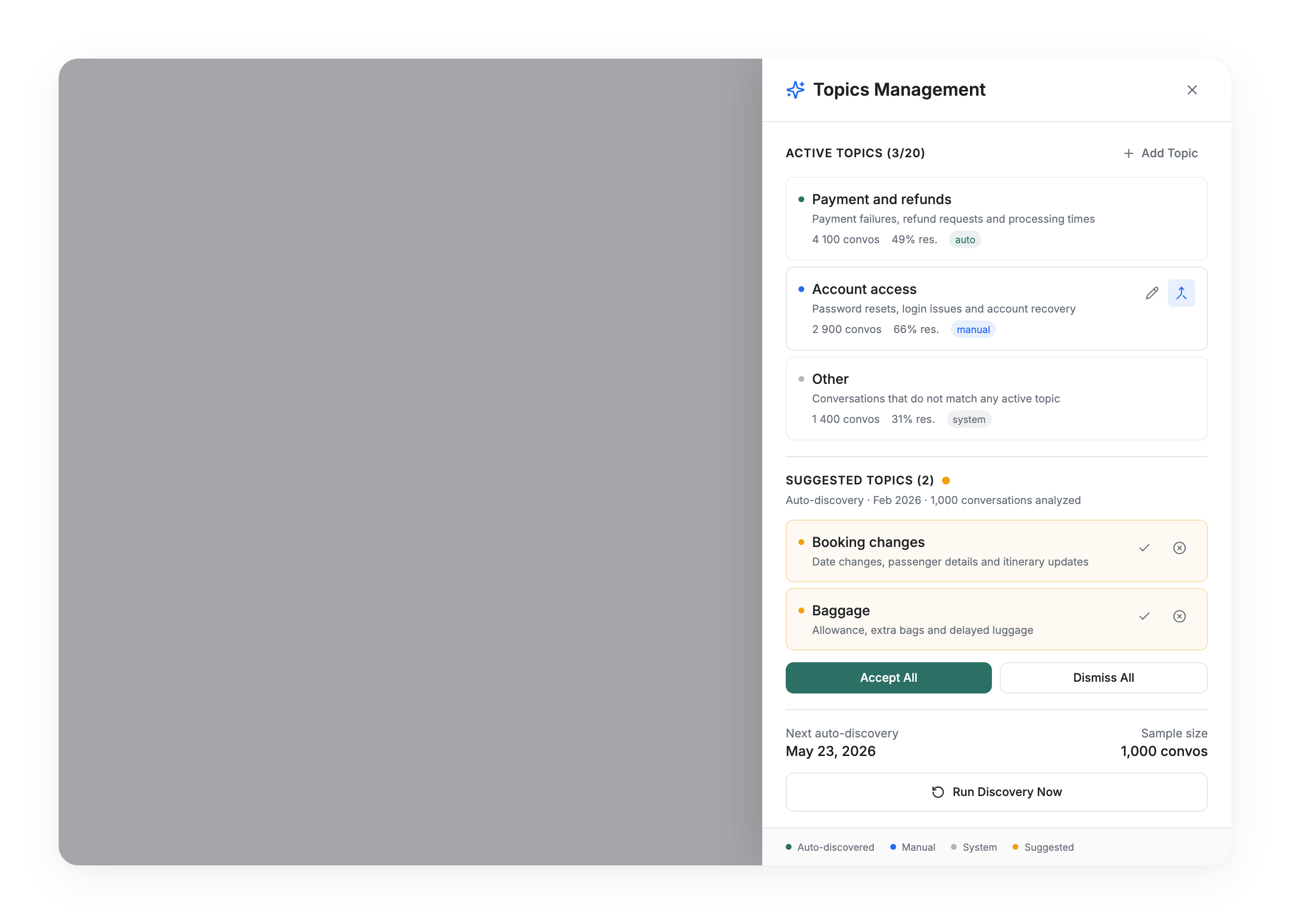
- You own the list. Open Topics in the top right of the dashboard to add, rename, merge, activate or deactivate topics. (Readers don't see this button — ask an admin on your account.)
- The bot suggests, you decide. Every 90 days, the system reads a sample of your conversations and proposes new topics based on what customers actually asked. Suggestions land in a Suggested Topics section and stay inactive until you accept them. Nothing is ever activated behind your back.
- Merge, don't delete. Topics can be merged into one another, never deleted — so your history stays consistent over time.
- Keep it tight. Up to 20 active topics. Beyond ~15 you'll see a warning: the more topics there are, the harder it gets for the AI to pick the right one — and your numbers get noisier. Merging similar ones is usually the right move.
Knowledge gaps — what the bot didn't know
A knowledge gap means the bot didn't have the information asked for — it said it didn't know, or refused without any useful guidance.
It is not a knowledge gap when the bot can't access personal or real-time data but correctly redirects to the right place. "What is your refund policy?" answered with "I don't know" is a gap. "Am I entitled to a refund on my booking?" answered with a link to the customer account is not — that's the correct behaviour.
Knowledge gaps show up in Health, in AI Impact, and broken down per topic in Performance → Knowledge Gaps by Topic. That last one is your content backlog, ranked.
Coverage, and what happens to your history
All your completed conversations are evaluated — AI-powered and scripted alike.
AI analysis starts on January 1, 2026. Conversations before that date were never evaluated and won't be retroactively. Concretely:
- Select a date range entirely before January 1, 2026 and the AI metrics show a blurred AI analysis unavailable placeholder.
- Select a range that starts before January 1, 2026 and ends after it, and the AI metrics only cover the part of the range from January 1, 2026 onwards — while volume, users and CSAT cover the whole range. To compare like for like, keep your date ranges inside 2026.
- Every other metric — volume, users, CSAT, handovers, use cases — is unaffected and covers your history back to June 1, 2023. Data collected before that date remains available in the Usage & Automation legacy dashboard.
How to read your first number
Your first resolution number will probably be lower than you expected. That reaction is normal, and the explanation is short.
Measuring it doesn't make your bot worse — it makes it visible. It's the same as satisfaction: the score existed before anyone measured it. You have data now, that's all.
Step 1 is measuring. Step 2 is improving. A low number is a starting point, not a verdict.
Here is why it reads low. The rate covers every completed conversation, scripted flows included — and a scripted flow only answers what it was explicitly written for. Anything outside its script counts as unresolved. So the number measures your whole coverage, not the quality of the answers you did write.
And remember what it counts: whether each customer request was actually handled — including the ones your bot correctly routed to a human. What matters is not the absolute value on day one. It's which topics sit behind it, and how the number moves once you work on them.
Two honest caveats:
- The evaluator is indicative, not perfect. It sometimes marks a conversation resolved when you would not, and sometimes the reverse. Use it to compare topics and to follow a trend over time — not to grade a single conversation.
- You always keep the last word. Click a number and read the conversations behind it — from the Sankey, the Topics treemap, the Louis section, Satisfaction, Use Cases and Performance. Judge for yourself. Nothing here is a black box.
Where to start. Open Performance → Unresolved Drivers. The topic at the top is where unresolved conversations pile up most — that's your first fix, not the one with the worst percentage. Read ten of those conversations. You'll usually find the same missing answer three times. Fix it, then take the next topic.
If you want help reading your numbers or turning them into a plan, your Customer Success Manager is the right person to talk to.
AI Insights
Knowing which topic fails is useful. Knowing why it fails is the next step. We're exploring AI Insights. Pick a topic that underperforms, and get a written diagnosis of what goes wrong in those conversations — plus recommended actions, built from the unresolved conversations themselves.
Nothing to do on your side — we'll announce it here if and when it ships.
No action required
The redesigned Analytics and AI Quality Monitoring are available on your platform. Open Analytics — the new experience is already there, and evaluation runs automatically on your completed conversations.
For a complete walkthrough — how AI Resolution is judged, what the CX Score weighs, and how to work your topics — check out the AI Quality Monitoring documentation.