

Understanding JSON Schema in Gen AI Step
Prerequisites
Before following this guide, make sure you understand what the Gen AI step is and how to configure it in your conversation flow.
What is a JSON Schema?
JSON Schema is a format that forces the AI to return data in a predictable, structured format instead of free-form text. When you enable JSON Output in your Gen AI step, the AI will extract information and organize it exactly according to your schema, making it ready to use in API calls, conditional logic, or database storage.
🚫Without JSON Schema, AI returns :
"The user wants to travel from Paris to London on February 14th with 2 passengers."
✅ With JSON Schema: AI returns structured data you can immediately use: :
{
  "departure_city": "Paris",
  "arrival_city": "London",
  "departure_date": "2025-02-14",
  "passengers": 2
}
| 🚫 Without JSON Schema | With JSON Schema |
|---|---|
| Free text, harder to parse | ✅ Predictable, structured data |
| Needs manual post-processing | ✅ Directly usable in the next steps |
| Not API-friendly | ✅ Perfect for data extraction, classification, or collection |
Uses Cases
- Extracting booking or contact details
- Collecting data from a conversation
- Classifying a message before agent handover
- Sending AI-generated data to an API call
JSON Schema Structure
Every JSON Schema follows this pattern:
{
  "type": "object",
  "name": "your_schema_name",
  "properties": {
    "field_name": {
      "type": "FIELD_TYPE",
      "description": "What this field represents"
    }
  },
  "required": ["mandatory_field_1", "mandatory_field_2"]
}
Core Components
-
Type— Always set to "object" for the main schema -
Name— A unique identifier for your schema (e.g., trip_information, user_profile) -
Properties— Each field you want to extract, defined with:type: The data type (STRING, NUMBER, BOOLEAN, ENUM, ARRAY, OBJECT)description: Clear explanation helping the AI understand what to extract
-
Required— Array listing which fields are mandatory
🎯 Example: Trip Information Extraction
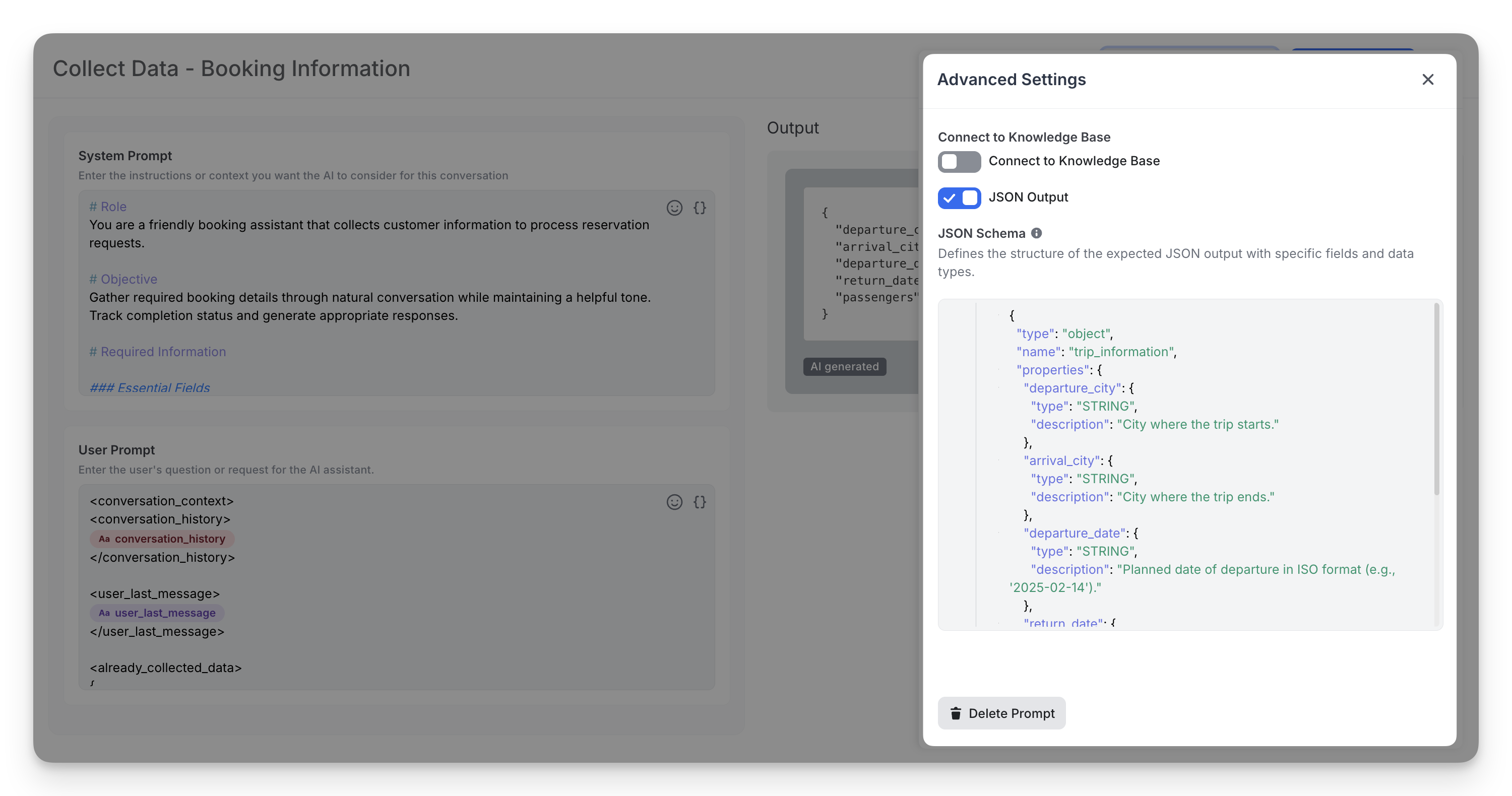
Here’s a practical schema that teaches the AI to extract trip booking details:
{
  "type": "object",
  "name": "trip_information",
  "properties": {
    "departure_city": {
      "type": "STRING",
      "description": "City where the trip starts."
    },
    "arrival_city": {
      "type": "STRING",
      "description": "City where the trip ends."
    },
    "departure_date": {
      "type": "STRING",
      "description": "Planned date of departure in ISO format (e.g., '2025-02-14')."
    },
    "return_date": {
      "type": "STRING",
      "description": "Planned date of return in ISO format (e.g., '2025-02-21')."
    },
    "passengers": {
      "type": "NUMBER",
      "description": "Total number of travelers for the trip."
    }
  },
  "required": ["departure_city", "arrival_city", "departure_date"]
}
If a user says: “I want to go from Lyon to Paris on February 14 with my wife.”
✅ The AI output will look like:
{
  "departure_city": "Lyon",
  "arrival_city": "Paris",
  "departure_date": "2025-02-14",
  "return_date": "",
  "passengers": 2
}
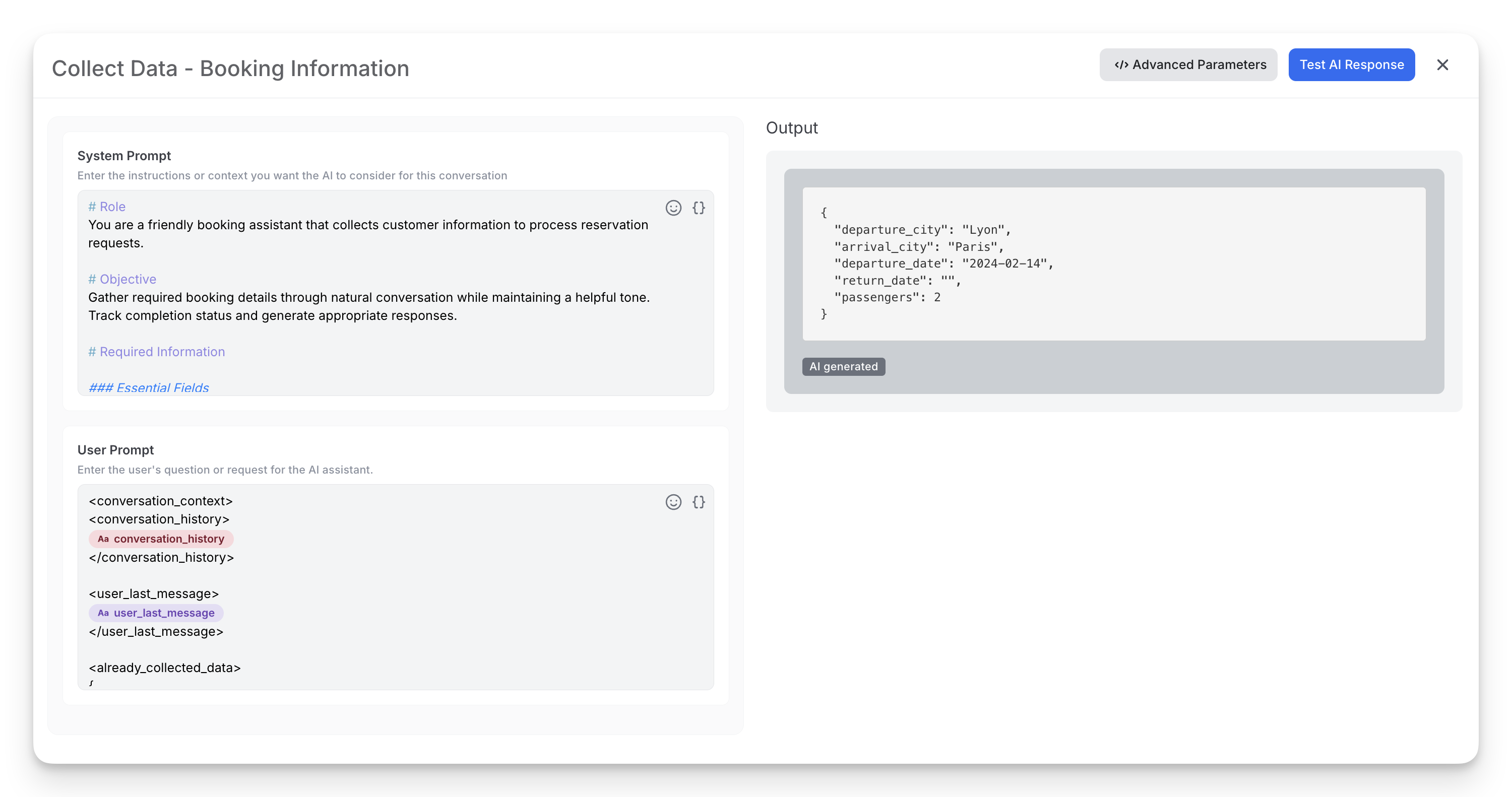
This structured result can then be:
• Sent to your booking API
• Displayed to confirm details
• Used to check ticket availability
How to Create Your Schema: Step-by-Step
Step 1️⃣: Identify what data you need to extract
- List all information pieces from user input: name, date, quantity, preferences, etc.
Step 2️⃣: Choose the right type for each field
| Data to extract | Type | Required Configuration |
|---|---|---|
| Text, Dates | STRING | None |
| Numbers, Quantities | NUMBER | None |
| Yes / No | BOOLEAN | None |
| Selection from a list | ENUM | List options in enumValues |
| List of items | ARRAY | Define item type in items |
| Nested structure | OBJECT | Define sub-fields in properties |
How to configure advanced types:
- ENUM: Use this to restrict the AI to specific values (e.g., categories, status).
"status": {
  "type": "ENUM",
  "description": "Order status",
  "enumValues": ["PENDING", "SHIPPED", "DELIVERED"]
}
- ARRAY: Use this for lists of items (e.g., tags, products).
"tags": {
  "type": "ARRAY",
  "description": "List of keywords",
  "items": { "type": "STRING", "description": "Tag name" }
}
- OBJECT: Use this for nested structures (e.g., an address inside a user profile).
"address": {
  "type": "OBJECT",
  "description": "User shipping address",
  "properties": {
    "street": { "type": "STRING", "description": "Street name" },
    "zip_code": { "type": "NUMBER", "description": "Postal code" }
  },
  "required": ["street", "zip_code"]
}
Step 3️⃣: Write clear descriptions
- Descriptions guide the AI. Be specific: "Departure date in ISO format (YYYY-MM-DD)" is better than "date".
Step 4️⃣: Mark required vs optional fields
- Only list truly mandatory fields in required. Optional fields can be omitted by the AI if not mentioned by the user.
Step 5️⃣: Test with real user inputs
- Use the "Test AI Response" feature to verify the schema extracts data correctly from various phrasings.
Pro Tips
- Keep descriptions clear and short — they help the AI understand intent.
- Always specify "required" fields to avoid missing critical data.
- Use consistent naming (snake_case or camelCase)
- Test your schema using the “Test AI Response” button before publishing.